## LangChain DeepAgents x AI Agent A2Z Deploy LangChain Examples Live
[Website](https://www.deepnlp.org/workspace/deploy) | [GitHub](https://github.com/aiagenta2z/agent_mcp_deployment) | [AI Agent Marketplace](https://www.deepnlp.org/store/ai-agent) | [AI Agent A2Z](https://www.aiagenta2z.com)
This guide shows how to convert a **LangChain DeepAgents** content-builder-agent into a production-ready live service using `BaseLiveRuntime` from ai-agent-marketplace
The runtime wraps your agent and exposes a **FastAPI streaming `/chat` endpoint** automatically.
## QuickStart
```
from ai_agent_marketplace.runtime.base import *
async def content_builder_stream_generator(
agent: Any,
user_query: str,
**kwargs
) -> AsyncGenerator[str, None]:
"""
"""
## more
runtime = BaseLiveRuntime(
agent=agent,
stream_handler=content_builder_stream_generator
)
## Returned a FastAPI based app with /chat endpoint
app = runtime.app
```
### Deploy the Server
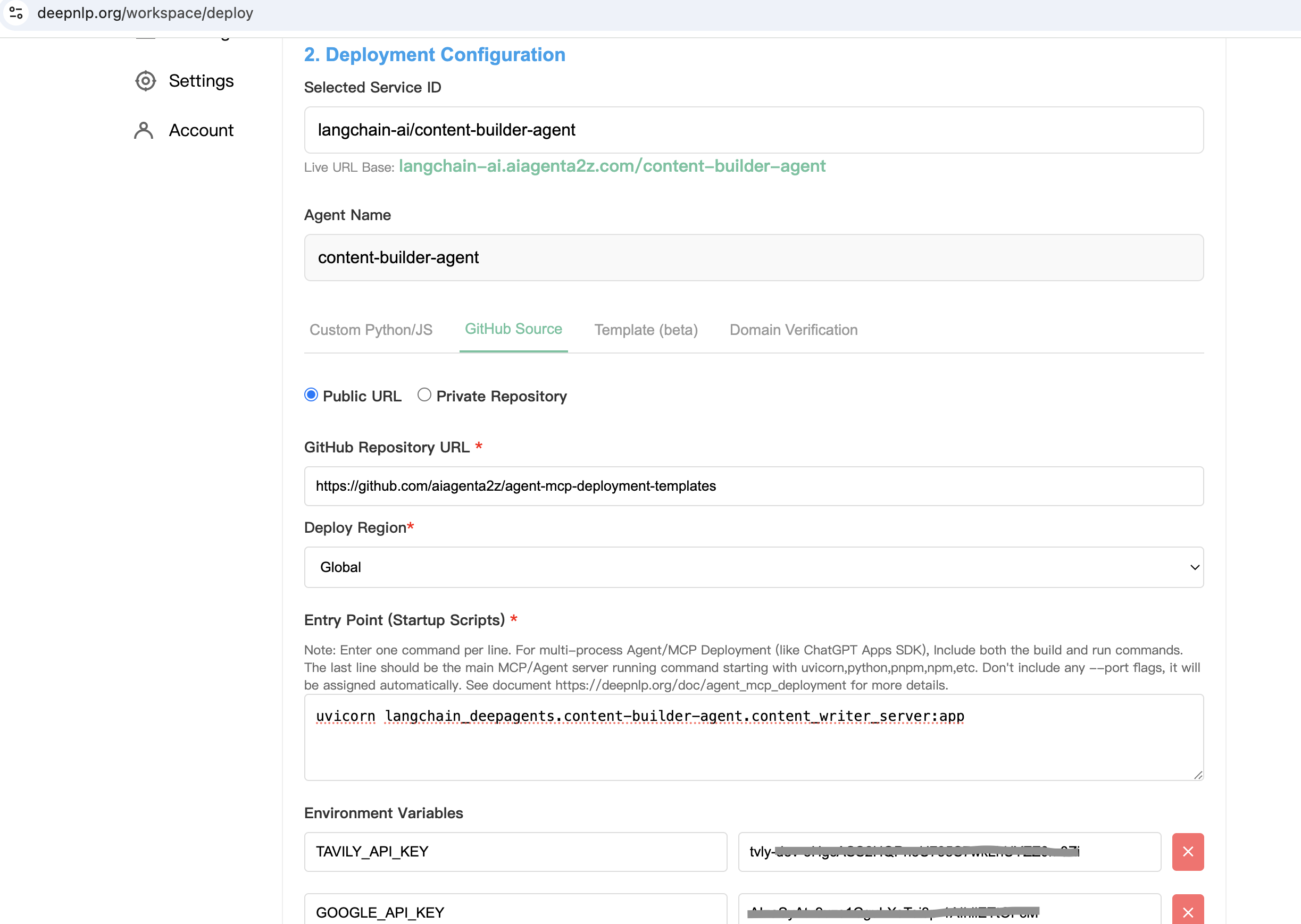
Step 1. Choose Github Tab
Step 2. Public url: https://github.com/aiagenta2z/agent-mcp-deployment-templates
Step 3.
Entry Point Command shell
```
uvicorn langchain_deepagents.deep_research.research_agent_server:app
```
Step 4.
Set the Environment Variables
```bash
# Set API keys
export GOOGLE_API_KEY="..." # For image generation
export TAVILY_API_KEY="..." # For web search (optional)
```
Step 5. Click Deploy and You will get the URL
 Get the Product /chat POST URL :
```
https://langchain-ai.aiagenta2z.com/content-builder-agent/chat
```
And you can see the running
Get the Product /chat POST URL :
```
https://langchain-ai.aiagenta2z.com/content-builder-agent/chat
```
And you can see the running
 ## 🚀 Architecture Summary
```
LangChain Agent
↓
Streaming Adapter (Async Generator)
↓
BaseLiveRuntime
↓
FastAPI App (/chat)
↓
Streaming JSON Response
```
## 2️⃣ Create a Streaming Adapter
Define an async generator that adapts your LangChain agent output into streaming chunks.
The async generator takes in two parameters: `agent` an customized agent object, `user_query`
that are parsed from the `messages` object from the "\chat" endpoints.
In the async generator, the agent calls `agent.invoke({"messages": messages})` methods.
```python
from ai_agent_marketplace.runtime.base import *
from typing import Any, AsyncGenerator
import json
import uuid
import asyncio
async def deepagents_stream_generator(
agent: Any,
user_query: str,
**kwargs
) -> AsyncGenerator[str, None]:
"""
Universal async adapter for LangChain agent
"""
# Send initial streaming message
initial_content = "Task Started and Research Take a Few Minutes"
initial_chunk = json.dumps(
assembly_message(
type=MESSAGE_TYPE_ASSISTANT,
format=OUTPUT_FORMAT_TEXT,
content=initial_content,
content_type=CONTENT_TYPE_MARKDOWN,
section=SECTION_ANSWER,
message_id=str(uuid.uuid4()),
template=TEMPLATE_STREAMING_CONTENT_TYPE,
)
)
yield initial_chunk + STREAMING_SEPARATOR_DEFAULT
await asyncio.sleep(0)
try:
# Call LangChain agent
messages = [{"role": "user", "content": user_query}]
result = agent.invoke({"messages": messages})
output_messages = result["messages"] if "messages" in result else []
for message in output_messages:
message_id, content, role = extract_message_content_langchain(message)
output_chunk = json.dumps(
assembly_message(
type=MESSAGE_TYPE_ASSISTANT,
format=OUTPUT_FORMAT_TEXT,
content=content,
content_type=CONTENT_TYPE_MARKDOWN,
section=SECTION_ANSWER,
message_id=message_id,
template=TEMPLATE_STREAMING_CONTENT_TYPE,
)
)
yield output_chunk + STREAMING_SEPARATOR_DEFAULT
except Exception:
yield json.dumps({}) + STREAMING_SEPARATOR_DEFAULT
```
---
## 3️⃣ Wrap the Agent with Runtime
```python
runtime = BaseLiveRuntime(
agent=agent,
stream_handler=deepagents_stream_generator
)
# FastAPI app with /chat endpoint
app = runtime.app
```
That's it.
You now have a production-ready FastAPI service.
---
## 4️⃣ Start the Server
```bash
uvicorn research_agent_server:app
```
Server will run at:
```
http://localhost:8000
```
---
## 5️⃣ Test with curl
### Case 1: Simple Math
```bash
curl -X POST "http://localhost:8000/chat" \
-H "Content-Type: application/json" \
-d '{"messages":[{"role":"user","content":"Calculate 1+1 result"}]}'
```
### Sample Streaming Output
```json
{"type":"assistant","format":"text","content":"Task Started...","section":"answer","message_id":"670d3458-a539-406f-a786-1afc0f0fc201","content_type":"text/markdown","template":"streaming_content_type"}
{"type":"assistant","format":"text","content":"Calculate 1+1 result","section":"answer","message_id":"701be311-37e3-4ee1-9519-6d8e65b47f59","content_type":"text/markdown","template":"streaming_content_type"}
{"type":"assistant","format":"text","content":"1 + 1 = 2","section":"answer","message_id":"lc_run--019c55fe-4ed2-7da3-9e05-0a8758aa10cc-0","content_type":"text/markdown","template":"streaming_content_type"}
```
---
### Case 2: Research Task
```bash
curl -X POST "http://localhost:8000/chat" \
-H "Content-Type: application/json" \
-d '{"messages":[{"role":"user","content":"research context engineering approaches used to build AI agents"}]}'
```
### Sample Streaming Output (Truncated)
```json
{"type":"assistant","content":"Task Started..."}
{"type":"assistant","content":"Updated todo list ..."}
{"type":"assistant","content":"Updated file /research_request.md"}
{"type":"assistant","content":"Here is a comprehensive report on context engineering approaches..."}
```
The response is streamed incrementally as the agent reasons, calls tools, and produces final output.
---
## 🌐 Deploy Example
You can also deploy publicly:
```bash
curl -X POST "https://deepagents.aiagenta2z.com/deep_research/chat" \
-H "Content-Type: application/json" \
-d '{"messages":[{"role":"user","content":"Calculate 1+1 result"}]}'
```
---
## ✅ What You Get
- Automatic `/chat` endpoint
- Streaming JSON output
- LangChain message compatibility
- Standardized message schema
- Ready for UI integration
- Production-ready FastAPI server
### Start the Server
The uvicorn will run the server at 8000 port
```
uvicorn content_writer_server:app
```
```
curl -X POST "https://deepagents.aiagenta2z.com/deep_research/chat" \
-H "Content-Type: application/json" \
-d '{"messages":[{"role":"user","content":"Calculate 1+1 result"}]}'
```
### Case 1:
```
curl -X POST "http://localhost:8000/chat" \
-H "Content-Type: application/json" \
-d '{"messages":[{"role":"user","content":"Calculate 1+1 result"}]}'
```
Result
```
{"type": "assistant", "format": "text", "content": "Task Started and Research Take a Few Minutes", "section": "answer", "message_id": "b25c451a-ee17-4b11-9e7a-f3102de4b751", "content_type": "text/markdown", "template": "streaming_content_type", "task_ids": "", "tab_message_ids": "", "tab_id": ""}
{"type": "assistant", "format": "text", "content": "Calculate 1+1 result", "section": "answer", "message_id": "069d5f7e-5916-4c41-90af-1b56c1c5c9bb", "content_type": "text/markdown", "template": "streaming_content_type", "task_ids": "", "tab_message_ids": "", "tab_id": ""}
{"type": "assistant", "format": "text", "content": "Calculate 1+1 result", "section": "answer", "message_id": "069d5f7e-5916-4c41-90af-1b56c1c5c9bb", "content_type": "text/markdown", "template": "streaming_content_type", "task_ids": "", "tab_message_ids": "", "tab_id": ""}
{"type": "assistant", "format": "text", "content": "Calculate 1+1 result", "section": "answer", "message_id": "069d5f7e-5916-4c41-90af-1b56c1c5c9bb", "content_type": "text/markdown", "template": "streaming_content_type", "task_ids": "", "tab_message_ids": "", "tab_id": ""}
{"type": "assistant", "format": "text", "content": "Calculate 1+1 result", "section": "answer", "message_id": "069d5f7e-5916-4c41-90af-1b56c1c5c9bb", "content_type": "text/markdown", "template": "streaming_content_type", "task_ids": "", "tab_message_ids": "", "tab_id": ""}
{"type": "assistant", "format": "text", "content": "Calculate 1+1 result", "section": "answer", "message_id": "069d5f7e-5916-4c41-90af-1b56c1c5c9bb", "content_type": "text/markdown", "template": "streaming_content_type", "task_ids": "", "tab_message_ids": "", "tab_id": ""}
{"type": "assistant", "format": "text", "content": "The result of 1 + 1 is 2.", "section": "answer", "message_id": "lc_run--019c5616-f704-77c2-b856-77aeb708e505-0", "content_type": "text/markdown", "template": "streaming_content_type", "task_ids": "", "tab_message_ids": "", "tab_id": ""}
```
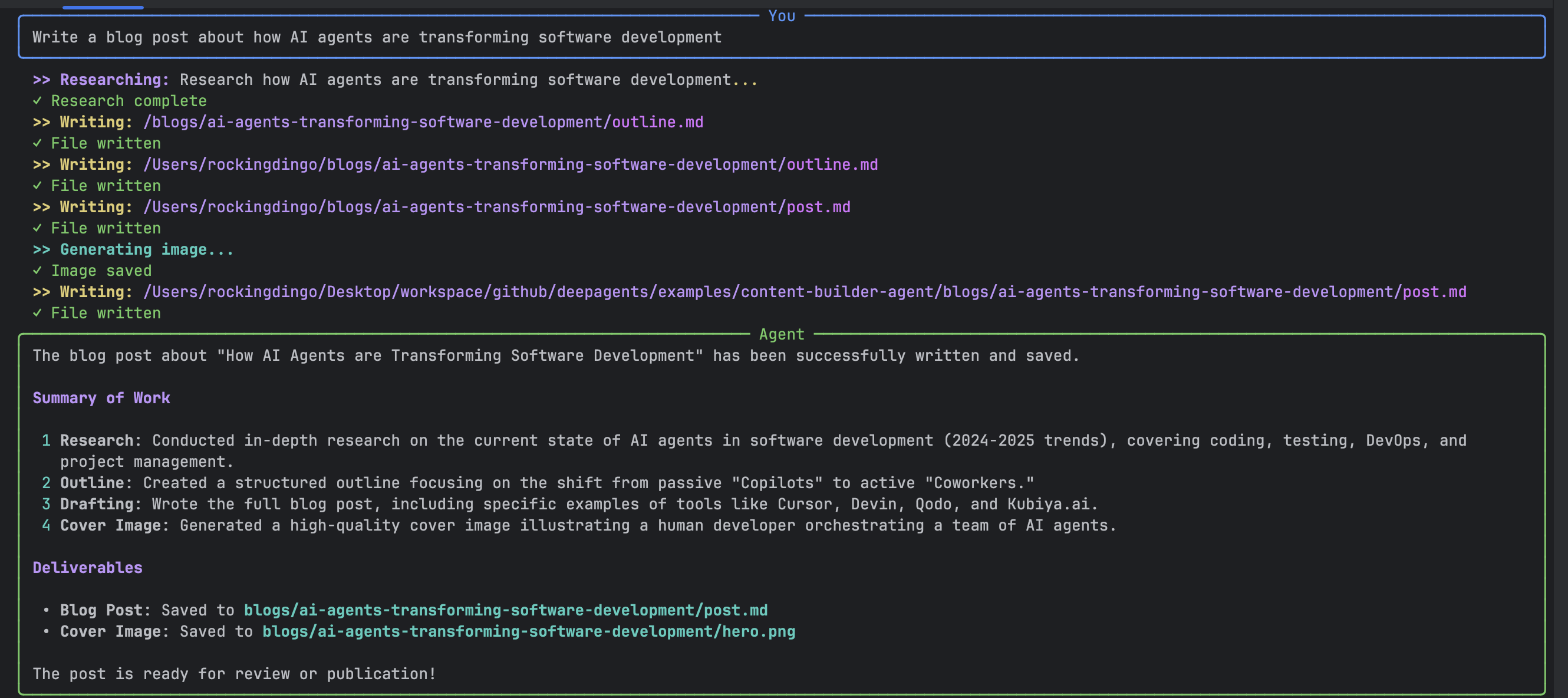
### Case 2: Write a blog post about how AI agents are transforming software development
Calling skills, generate blogs images (Nano Banana) and streaming back a blog content
curl -X POST "http://localhost:8000/chat" \
-H "Content-Type: application/json" \
-d '{"messages":[{"role":"user","content":"Write a blog post about how AI agents are transforming software development"}]}'
```
{"type": "assistant", "format": "text", "content": "Task Started and Research Take a Few Minutes", "section": "answer", "message_id": "72351ba1-1377-4e8f-a8ca-5b095b245034", "content_type": "text/markdown", "template": "streaming_content_type", "task_ids": "", "tab_message_ids": "", "tab_id": ""}
{"type": "assistant", "format": "text", "content": "Write a blog post about how AI agents are transforming software development", "section": "answer", "message_id": "c8a88daf-ef6d-4301-9c1f-b8f6b84d7f60", "content_type": "text/markdown", "template": "streaming_content_type", "task_ids": "", "tab_message_ids": "", "tab_id": ""}
{"type": "assistant", "format": "text", "content": "Write a blog post about how AI agents are transforming software development", "section": "answer", "message_id": "c8a88daf-ef6d-4301-9c1f-b8f6b84d7f60", "content_type": "text/markdown", "template": "streaming_content_type", "task_ids": "", "tab_message_ids": "", "tab_id": ""}
{"type": "assistant", "format": "text", "content": "Write a blog post about how AI agents are transforming software development", "section": "answer", "message_id": "c8a88daf-ef6d-4301-9c1f-b8f6b84d7f60", "content_type": "text/markdown", "template": "streaming_content_type", "task_ids": "", "tab_message_ids": "", "tab_id": ""}
{"type": "assistant", "format": "text", "content": "Write a blog post about how AI agents are transforming software development", "section": "answer", "message_id": "c8a88daf-ef6d-4301-9c1f-b8f6b84d7f60", "content_type": "text/markdown", "template": "streaming_content_type", "task_ids": "", "tab_message_ids": "", "tab_id": ""}
{"type": "assistant", "format": "text", "content": "Write a blog post about how AI agents are transforming software development", "section": "answer", "message_id": "c8a88daf-ef6d-4301-9c1f-b8f6b84d7f60", "content_type": "text/markdown", "template": "streaming_content_type", "task_ids": "", "tab_message_ids": "", "tab_id": ""}
{"type": "assistant", "format": "text", "content": "", "section": "answer", "message_id": "lc_run--019c5617-b6b3-7f02-9171-88f734f5f57b-0", "content_type": "text/markdown", "template": "streaming_content_type", "task_ids": "", "tab_message_ids": "", "tab_id": ""}
{"type": "assistant", "format": "text", "content": "Write a blog post about how AI agents are transforming software development", "section": "answer", "message_id": "c8a88daf-ef6d-4301-9c1f-b8f6b84d7f60", "content_type": "text/markdown", "template": "streaming_content_type", "task_ids": "", "tab_message_ids": "", "tab_id": ""}
{"type": "assistant", "format": "text", "content": "", "section": "answer", "message_id": "lc_run--019c5617-b6b3-7f02-9171-88f734f5f57b-0", "content_type": "text/markdown", "template": "streaming_content_type", "task_ids": "", "tab_message_ids": "", "tab_id": ""}
{"type": "assistant", "format": "text", "content": "Updated todo list to [{'content': \"Load 'blog-post' skill\", 'status': 'in_progress'}, {'content': \"Research 'how AI agents are transforming software development' using researcher subagent\", 'status': 'pending'}, {'content': 'Create blog post outline', 'status': 'pending'}, {'content': 'Write blog post draft', 'status': 'pending'}, {'content': 'Generate cover image for blog post', 'status': 'pending'}, {'content': 'Finalize blog post', 'status': 'pending'}]", "section": "answer", "message_id": "a3252477-d91e-4e03-8e60-05a3b9e53e56", "content_type": "text/markdown", "template": "streaming_content_type", "task_ids": "", "tab_message_ids": "", "tab_id": ""}
{"type": "assistant", "format": "text", "content": "\n# Blog Post Writing Skill\n\nThis skill provides a structured workflow for creating high-quality blog posts that educate and engage readers.\n\n## When to Use This Skill\n\nUse this skill when asked to:\n- Write a blog post or article\n- Create a tutorial or how-to guide\n- Develop educational long-form content\n- Write thought leadership pieces\n\n## Research First (Required)\n\n**Before writing any blog post, you MUST delegate research:**\n\n1. Use the `task` tool with `subagent_type: \"researcher\"`\n2. In the description, specify BOTH the topic AND where to save:\n\n```\ntask(\n subagent_type=\"researcher\",\n description=\"Research [TOPIC]. Save findings to research/[slug].md\"\n)\n```\n\nExample:\n```\ntask(\n subagent_type=\"researcher\",\n description=\"Research the current state of AI agents in 2025. Save findings to research/ai-agents-2025.md\"\n)\n```\n\n3. After research completes, read the findings file before writing\n\n## Output Structure (Required)\n\n**Every blog post MUST have both a post AND a cover image:**\n\n```\nblogs/\n\u2514\u2500\u2500 /\n \u251c\u2500\u2500 post.md # The blog post content\n \u2514\u2500\u2500 hero.png # REQUIRED: Generated cover image\n```\n\nExample: A post about \"AI Agents in 2025\" \u2192 `blogs/ai-agents-2025/`\n\n**You MUST complete both steps:**\n1. Write the post to `blogs//post.md`\n2. Generate a cover image using `generate_image` and save to `blogs//hero.png`\n\n**A blog post is NOT complete without its cover image.**\n\n## Blog Post Structure\n\nEvery blog post should follow this structure:\n\n### 1. Hook (Opening)\n- Start with a compelling question, statistic, or statement\n- Make the reader want to continue\n- Keep it to 2-3 sentences\n\n### 2. Context (The Problem)\n- Explain why this topic matters\n- Describe the problem or opportunity\n- Connect to the reader's experience\n\n### 3. Main Content (The Solution)\n- Break into 3-5 main sections with H2 headers\n- Each section covers one key point\n- Include code examples, diagrams, or screenshots where helpful\n- Use bullet points for lists\n\n### 4. Practical Application\n- Show how to apply the concepts\n- Include step-by-step instructions if applicable\n- Provide code snippets or templates\n\n### 5. Conclusion & CTA\n- Summarize key takeaways (3 bullets max)\n- End with a clear call-to-action\n- Link to related resources\n\n## Cover Image Generation\n\nAfter writing the post, generate a cover image using the `generate_cover` tool:\n\n```\ngenerate_cover(prompt=\"A detailed description of the image...\", slug=\"your-blog-slug\")\n```\n\nThe tool saves the image to `blogs//hero.png`.\n\n### Writing Effective Image Prompts\n\nStructure your prompt with these elements:\n\n1. **Subject**: What is the main focus? Be specific and concrete.\n2. **Style**: Art direction (minimalist, isometric, flat design, 3D render, watercolor, etc.)\n3. **Composition**: How elements are arranged (centered, rule of thirds, symmetrical)\n4. **Color palette**: Specific colors or mood (warm earth tones, cool blues and purples, high contrast)\n5. **Lighting/Atmosphere**: Soft diffused light, dramatic shadows, golden hour, neon glow\n6. **Technical details**: Aspect ratio considerations, negative space for text overlay\n\n### Example Prompts\n\n**For a technical blog post:**\n```\nIsometric 3D illustration of interconnected glowing cubes representing AI agents, each cube has subtle circuit patterns. Cubes connected by luminous data streams. Deep navy background (#0a192f) with electric blue (#64ffda) and soft purple (#c792ea) accents. Clean minimal style, lots of negative space at top for title. Professional tech aesthetic.\n```\n\n**For a tutorial/how-to:**\n```\nClean flat illustration of hands typing on a keyboard with abstract code symbols floating upward, transforming into lightbulbs and gears. Warm gradient background from soft coral to light peach. Friendly, approachable style. Centered composition with space for text overlay.\n```\n\n**For thought leadership:**\n```\nAbstract visualization of a human silhouette profile merging with geometric neural network patterns. Split composition - organic watercolor texture on left transitioning to clean vector lines on right. Muted sage green and warm terracotta color scheme. Contemplative, forward-thinking mood.\n```\n\n## SEO Considerations\n\n- Include the main keyword in the title and first paragraph\n- Use the keyword naturally 3-5 times throughout\n- Keep the title under 60 characters\n- Write a meta description (150-160 characters)\n\n## Quality Checklist\n\nBefore finishing:\n- [ ] Post saved to `blogs//post.md`\n- [ ] Hero image generated at `blogs//hero.png`\n- [ ] Hook grabs attention in first 2 sentences\n- [ ] Each section has a clear purpose\n- [ ] Conclusion summarizes key points\n- [ ] CTA tells reader what to do next\n", "section": "answer", "message_id": "cb25f8ff-24cc-4538-9d69-97068cda5e86", "content_type": "text/markdown", "template": "streaming_content_type", "task_ids": "", "tab_message_ids": "", "tab_id": ""}
{"type": "assistant", "format": "text", "content": "Write a blog post about how AI agents are transforming software development", "section": "answer", "message_id": "c8a88daf-ef6d-4301-9c1f-b8f6b84d7f60", "content_type": "text/markdown", "template": "streaming_content_type", "task_ids": "", "tab_message_ids": "", "tab_id": ""}
{"type": "assistant", "format": "text", "content": "", "section": "answer", "message_id": "lc_run--019c5617-b6b3-7f02-9171-88f734f5f57b-0", "content_type": "text/markdown", "template": "streaming_content_type", "task_ids": "", "tab_message_ids": "", "tab_id": ""}
{"type": "assistant", "format": "text", "content": "Updated todo list to [{'content': \"Load 'blog-post' skill\", 'status': 'in_progress'}, {'content': \"Research 'how AI agents are transforming software development' using researcher subagent\", 'status': 'pending'}, {'content': 'Create blog post outline', 'status': 'pending'}, {'content': 'Write blog post draft', 'status': 'pending'}, {'content': 'Generate cover image for blog post', 'status': 'pending'}, {'content': 'Finalize blog post', 'status': 'pending'}]", "section": "answer", "message_id": "a3252477-d91e-4e03-8e60-05a3b9e53e56", "content_type": "text/markdown", "template": "streaming_content_type", "task_ids": "", "tab_message_ids": "", "tab_id": ""}
{"type": "assistant", "format": "text", "content": "\n# Blog Post Writing Skill\n\nThis skill provides a structured workflow for creating high-quality blog posts that educate and engage readers.\n\n## When to Use This Skill\n\nUse this skill when asked to:\n- Write a blog post or article\n- Create a tutorial or how-to guide\n- Develop educational long-form content\n- Write thought leadership pieces\n\n## Research First (Required)\n\n**Before writing any blog post, you MUST delegate research:**\n\n1. Use the `task` tool with `subagent_type: \"researcher\"`\n2. In the description, specify BOTH the topic AND where to save:\n\n```\ntask(\n subagent_type=\"researcher\",\n description=\"Research [TOPIC]. Save findings to research/[slug].md\"\n)\n```\n\nExample:\n```\ntask(\n subagent_type=\"researcher\",\n description=\"Research the current state of AI agents in 2025. Save findings to research/ai-agents-2025.md\"\n)\n```\n\n3. After research completes, read the findings file before writing\n\n## Output Structure (Required)\n\n**Every blog post MUST have both a post AND a cover image:**\n\n```\nblogs/\n\u2514\u2500\u2500 /\n \u251c\u2500\u2500 post.md # The blog post content\n \u2514\u2500\u2500 hero.png # REQUIRED: Generated cover image\n```\n\nExample: A post about \"AI Agents in 2025\" \u2192 `blogs/ai-agents-2025/`\n\n**You MUST complete both steps:**\n1. Write the post to `blogs//post.md`\n2. Generate a cover image using `generate_image` and save to `blogs//hero.png`\n\n**A blog post is NOT complete without its cover image.**\n\n## Blog Post Structure\n\nEvery blog post should follow this structure:\n\n### 1. Hook (Opening)\n- Start with a compelling question, statistic, or statement\n- Make the reader want to continue\n- Keep it to 2-3 sentences\n\n### 2. Context (The Problem)\n- Explain why this topic matters\n- Describe the problem or opportunity\n- Connect to the reader's experience\n\n### 3. Main Content (The Solution)\n- Break into 3-5 main sections with H2 headers\n- Each section covers one key point\n- Include code examples, diagrams, or screenshots where helpful\n- Use bullet points for lists\n\n### 4. Practical Application\n- Show how to apply the concepts\n- Include step-by-step instructions if applicable\n- Provide code snippets or templates\n\n### 5. Conclusion & CTA\n- Summarize key takeaways (3 bullets max)\n- End with a clear call-to-action\n- Link to related resources\n\n## Cover Image Generation\n\nAfter writing the post, generate a cover image using the `generate_cover` tool:\n\n```\ngenerate_cover(prompt=\"A detailed description of the image...\", slug=\"your-blog-slug\")\n```\n\nThe tool saves the image to `blogs//hero.png`.\n\n### Writing Effective Image Prompts\n\nStructure your prompt with these elements:\n\n1. **Subject**: What is the main focus? Be specific and concrete.\n2. **Style**: Art direction (minimalist, isometric, flat design, 3D render, watercolor, etc.)\n3. **Composition**: How elements are arranged (centered, rule of thirds, symmetrical)\n4. **Color palette**: Specific colors or mood (warm earth tones, cool blues and purples, high contrast)\n5. **Lighting/Atmosphere**: Soft diffused light, dramatic shadows, golden hour, neon glow\n6. **Technical details**: Aspect ratio considerations, negative space for text overlay\n\n### Example Prompts\n\n**For a technical blog post:**\n```\nIsometric 3D illustration of interconnected glowing cubes representing AI agents, each cube has subtle circuit patterns. Cubes connected by luminous data streams. Deep navy background (#0a192f) with electric blue (#64ffda) and soft purple (#c792ea) accents. Clean minimal style, lots of negative space at top for title. Professional tech aesthetic.\n```\n\n**For a tutorial/how-to:**\n```\nClean flat illustration of hands typing on a keyboard with abstract code symbols floating upward, transforming into lightbulbs and gears. Warm gradient background from soft coral to light peach. Friendly, approachable style. Centered composition with space for text overlay.\n```\n\n**For thought leadership:**\n```\nAbstract visualization of a human silhouette profile merging with geometric neural network patterns. Split composition - organic watercolor texture on left transitioning to clean vector lines on right. Muted sage green and warm terracotta color scheme. Contemplative, forward-thinking mood.\n```\n\n## SEO Considerations\n\n- Include the main keyword in the title and first paragraph\n- Use the keyword naturally 3-5 times throughout\n- Keep the title under 60 characters\n- Write a meta description (150-160 characters)\n\n## Quality Checklist\n\nBefore finishing:\n- [ ] Post saved to `blogs//post.md`\n- [ ] Hero image generated at `blogs//hero.png`\n- [ ] Hook grabs attention in first 2 sentences\n- [ ] Each section has a clear purpose\n- [ ] Conclusion summarizes key points\n- [ ] CTA tells reader what to do next\n", "section": "answer", "message_id": "cb25f8ff-24cc-4538-9d69-97068cda5e86", "content_type": "text/markdown", "template": "streaming_content_type", "task_ids": "", "tab_message_ids": "", "tab_id": ""}
{"type": "assistant", "format": "text", "content": "", "section": "answer", "message_id": "lc_run--019c5617-d321-7c31-a30a-04b9244a2a4d-0", "content_type": "text/markdown", "template": "streaming_content_type", "task_ids": "", "tab_message_ids": "", "tab_id": ""}
```
# Content Builder Agent
## 🚀 Architecture Summary
```
LangChain Agent
↓
Streaming Adapter (Async Generator)
↓
BaseLiveRuntime
↓
FastAPI App (/chat)
↓
Streaming JSON Response
```
## 2️⃣ Create a Streaming Adapter
Define an async generator that adapts your LangChain agent output into streaming chunks.
The async generator takes in two parameters: `agent` an customized agent object, `user_query`
that are parsed from the `messages` object from the "\chat" endpoints.
In the async generator, the agent calls `agent.invoke({"messages": messages})` methods.
```python
from ai_agent_marketplace.runtime.base import *
from typing import Any, AsyncGenerator
import json
import uuid
import asyncio
async def deepagents_stream_generator(
agent: Any,
user_query: str,
**kwargs
) -> AsyncGenerator[str, None]:
"""
Universal async adapter for LangChain agent
"""
# Send initial streaming message
initial_content = "Task Started and Research Take a Few Minutes"
initial_chunk = json.dumps(
assembly_message(
type=MESSAGE_TYPE_ASSISTANT,
format=OUTPUT_FORMAT_TEXT,
content=initial_content,
content_type=CONTENT_TYPE_MARKDOWN,
section=SECTION_ANSWER,
message_id=str(uuid.uuid4()),
template=TEMPLATE_STREAMING_CONTENT_TYPE,
)
)
yield initial_chunk + STREAMING_SEPARATOR_DEFAULT
await asyncio.sleep(0)
try:
# Call LangChain agent
messages = [{"role": "user", "content": user_query}]
result = agent.invoke({"messages": messages})
output_messages = result["messages"] if "messages" in result else []
for message in output_messages:
message_id, content, role = extract_message_content_langchain(message)
output_chunk = json.dumps(
assembly_message(
type=MESSAGE_TYPE_ASSISTANT,
format=OUTPUT_FORMAT_TEXT,
content=content,
content_type=CONTENT_TYPE_MARKDOWN,
section=SECTION_ANSWER,
message_id=message_id,
template=TEMPLATE_STREAMING_CONTENT_TYPE,
)
)
yield output_chunk + STREAMING_SEPARATOR_DEFAULT
except Exception:
yield json.dumps({}) + STREAMING_SEPARATOR_DEFAULT
```
---
## 3️⃣ Wrap the Agent with Runtime
```python
runtime = BaseLiveRuntime(
agent=agent,
stream_handler=deepagents_stream_generator
)
# FastAPI app with /chat endpoint
app = runtime.app
```
That's it.
You now have a production-ready FastAPI service.
---
## 4️⃣ Start the Server
```bash
uvicorn research_agent_server:app
```
Server will run at:
```
http://localhost:8000
```
---
## 5️⃣ Test with curl
### Case 1: Simple Math
```bash
curl -X POST "http://localhost:8000/chat" \
-H "Content-Type: application/json" \
-d '{"messages":[{"role":"user","content":"Calculate 1+1 result"}]}'
```
### Sample Streaming Output
```json
{"type":"assistant","format":"text","content":"Task Started...","section":"answer","message_id":"670d3458-a539-406f-a786-1afc0f0fc201","content_type":"text/markdown","template":"streaming_content_type"}
{"type":"assistant","format":"text","content":"Calculate 1+1 result","section":"answer","message_id":"701be311-37e3-4ee1-9519-6d8e65b47f59","content_type":"text/markdown","template":"streaming_content_type"}
{"type":"assistant","format":"text","content":"1 + 1 = 2","section":"answer","message_id":"lc_run--019c55fe-4ed2-7da3-9e05-0a8758aa10cc-0","content_type":"text/markdown","template":"streaming_content_type"}
```
---
### Case 2: Research Task
```bash
curl -X POST "http://localhost:8000/chat" \
-H "Content-Type: application/json" \
-d '{"messages":[{"role":"user","content":"research context engineering approaches used to build AI agents"}]}'
```
### Sample Streaming Output (Truncated)
```json
{"type":"assistant","content":"Task Started..."}
{"type":"assistant","content":"Updated todo list ..."}
{"type":"assistant","content":"Updated file /research_request.md"}
{"type":"assistant","content":"Here is a comprehensive report on context engineering approaches..."}
```
The response is streamed incrementally as the agent reasons, calls tools, and produces final output.
---
## 🌐 Deploy Example
You can also deploy publicly:
```bash
curl -X POST "https://deepagents.aiagenta2z.com/deep_research/chat" \
-H "Content-Type: application/json" \
-d '{"messages":[{"role":"user","content":"Calculate 1+1 result"}]}'
```
---
## ✅ What You Get
- Automatic `/chat` endpoint
- Streaming JSON output
- LangChain message compatibility
- Standardized message schema
- Ready for UI integration
- Production-ready FastAPI server
### Start the Server
The uvicorn will run the server at 8000 port
```
uvicorn content_writer_server:app
```
```
curl -X POST "https://deepagents.aiagenta2z.com/deep_research/chat" \
-H "Content-Type: application/json" \
-d '{"messages":[{"role":"user","content":"Calculate 1+1 result"}]}'
```
### Case 1:
```
curl -X POST "http://localhost:8000/chat" \
-H "Content-Type: application/json" \
-d '{"messages":[{"role":"user","content":"Calculate 1+1 result"}]}'
```
Result
```
{"type": "assistant", "format": "text", "content": "Task Started and Research Take a Few Minutes", "section": "answer", "message_id": "b25c451a-ee17-4b11-9e7a-f3102de4b751", "content_type": "text/markdown", "template": "streaming_content_type", "task_ids": "", "tab_message_ids": "", "tab_id": ""}
{"type": "assistant", "format": "text", "content": "Calculate 1+1 result", "section": "answer", "message_id": "069d5f7e-5916-4c41-90af-1b56c1c5c9bb", "content_type": "text/markdown", "template": "streaming_content_type", "task_ids": "", "tab_message_ids": "", "tab_id": ""}
{"type": "assistant", "format": "text", "content": "Calculate 1+1 result", "section": "answer", "message_id": "069d5f7e-5916-4c41-90af-1b56c1c5c9bb", "content_type": "text/markdown", "template": "streaming_content_type", "task_ids": "", "tab_message_ids": "", "tab_id": ""}
{"type": "assistant", "format": "text", "content": "Calculate 1+1 result", "section": "answer", "message_id": "069d5f7e-5916-4c41-90af-1b56c1c5c9bb", "content_type": "text/markdown", "template": "streaming_content_type", "task_ids": "", "tab_message_ids": "", "tab_id": ""}
{"type": "assistant", "format": "text", "content": "Calculate 1+1 result", "section": "answer", "message_id": "069d5f7e-5916-4c41-90af-1b56c1c5c9bb", "content_type": "text/markdown", "template": "streaming_content_type", "task_ids": "", "tab_message_ids": "", "tab_id": ""}
{"type": "assistant", "format": "text", "content": "Calculate 1+1 result", "section": "answer", "message_id": "069d5f7e-5916-4c41-90af-1b56c1c5c9bb", "content_type": "text/markdown", "template": "streaming_content_type", "task_ids": "", "tab_message_ids": "", "tab_id": ""}
{"type": "assistant", "format": "text", "content": "The result of 1 + 1 is 2.", "section": "answer", "message_id": "lc_run--019c5616-f704-77c2-b856-77aeb708e505-0", "content_type": "text/markdown", "template": "streaming_content_type", "task_ids": "", "tab_message_ids": "", "tab_id": ""}
```
### Case 2: Write a blog post about how AI agents are transforming software development
Calling skills, generate blogs images (Nano Banana) and streaming back a blog content
curl -X POST "http://localhost:8000/chat" \
-H "Content-Type: application/json" \
-d '{"messages":[{"role":"user","content":"Write a blog post about how AI agents are transforming software development"}]}'
```
{"type": "assistant", "format": "text", "content": "Task Started and Research Take a Few Minutes", "section": "answer", "message_id": "72351ba1-1377-4e8f-a8ca-5b095b245034", "content_type": "text/markdown", "template": "streaming_content_type", "task_ids": "", "tab_message_ids": "", "tab_id": ""}
{"type": "assistant", "format": "text", "content": "Write a blog post about how AI agents are transforming software development", "section": "answer", "message_id": "c8a88daf-ef6d-4301-9c1f-b8f6b84d7f60", "content_type": "text/markdown", "template": "streaming_content_type", "task_ids": "", "tab_message_ids": "", "tab_id": ""}
{"type": "assistant", "format": "text", "content": "Write a blog post about how AI agents are transforming software development", "section": "answer", "message_id": "c8a88daf-ef6d-4301-9c1f-b8f6b84d7f60", "content_type": "text/markdown", "template": "streaming_content_type", "task_ids": "", "tab_message_ids": "", "tab_id": ""}
{"type": "assistant", "format": "text", "content": "Write a blog post about how AI agents are transforming software development", "section": "answer", "message_id": "c8a88daf-ef6d-4301-9c1f-b8f6b84d7f60", "content_type": "text/markdown", "template": "streaming_content_type", "task_ids": "", "tab_message_ids": "", "tab_id": ""}
{"type": "assistant", "format": "text", "content": "Write a blog post about how AI agents are transforming software development", "section": "answer", "message_id": "c8a88daf-ef6d-4301-9c1f-b8f6b84d7f60", "content_type": "text/markdown", "template": "streaming_content_type", "task_ids": "", "tab_message_ids": "", "tab_id": ""}
{"type": "assistant", "format": "text", "content": "Write a blog post about how AI agents are transforming software development", "section": "answer", "message_id": "c8a88daf-ef6d-4301-9c1f-b8f6b84d7f60", "content_type": "text/markdown", "template": "streaming_content_type", "task_ids": "", "tab_message_ids": "", "tab_id": ""}
{"type": "assistant", "format": "text", "content": "", "section": "answer", "message_id": "lc_run--019c5617-b6b3-7f02-9171-88f734f5f57b-0", "content_type": "text/markdown", "template": "streaming_content_type", "task_ids": "", "tab_message_ids": "", "tab_id": ""}
{"type": "assistant", "format": "text", "content": "Write a blog post about how AI agents are transforming software development", "section": "answer", "message_id": "c8a88daf-ef6d-4301-9c1f-b8f6b84d7f60", "content_type": "text/markdown", "template": "streaming_content_type", "task_ids": "", "tab_message_ids": "", "tab_id": ""}
{"type": "assistant", "format": "text", "content": "", "section": "answer", "message_id": "lc_run--019c5617-b6b3-7f02-9171-88f734f5f57b-0", "content_type": "text/markdown", "template": "streaming_content_type", "task_ids": "", "tab_message_ids": "", "tab_id": ""}
{"type": "assistant", "format": "text", "content": "Updated todo list to [{'content': \"Load 'blog-post' skill\", 'status': 'in_progress'}, {'content': \"Research 'how AI agents are transforming software development' using researcher subagent\", 'status': 'pending'}, {'content': 'Create blog post outline', 'status': 'pending'}, {'content': 'Write blog post draft', 'status': 'pending'}, {'content': 'Generate cover image for blog post', 'status': 'pending'}, {'content': 'Finalize blog post', 'status': 'pending'}]", "section": "answer", "message_id": "a3252477-d91e-4e03-8e60-05a3b9e53e56", "content_type": "text/markdown", "template": "streaming_content_type", "task_ids": "", "tab_message_ids": "", "tab_id": ""}
{"type": "assistant", "format": "text", "content": "\n# Blog Post Writing Skill\n\nThis skill provides a structured workflow for creating high-quality blog posts that educate and engage readers.\n\n## When to Use This Skill\n\nUse this skill when asked to:\n- Write a blog post or article\n- Create a tutorial or how-to guide\n- Develop educational long-form content\n- Write thought leadership pieces\n\n## Research First (Required)\n\n**Before writing any blog post, you MUST delegate research:**\n\n1. Use the `task` tool with `subagent_type: \"researcher\"`\n2. In the description, specify BOTH the topic AND where to save:\n\n```\ntask(\n subagent_type=\"researcher\",\n description=\"Research [TOPIC]. Save findings to research/[slug].md\"\n)\n```\n\nExample:\n```\ntask(\n subagent_type=\"researcher\",\n description=\"Research the current state of AI agents in 2025. Save findings to research/ai-agents-2025.md\"\n)\n```\n\n3. After research completes, read the findings file before writing\n\n## Output Structure (Required)\n\n**Every blog post MUST have both a post AND a cover image:**\n\n```\nblogs/\n\u2514\u2500\u2500 /\n \u251c\u2500\u2500 post.md # The blog post content\n \u2514\u2500\u2500 hero.png # REQUIRED: Generated cover image\n```\n\nExample: A post about \"AI Agents in 2025\" \u2192 `blogs/ai-agents-2025/`\n\n**You MUST complete both steps:**\n1. Write the post to `blogs//post.md`\n2. Generate a cover image using `generate_image` and save to `blogs//hero.png`\n\n**A blog post is NOT complete without its cover image.**\n\n## Blog Post Structure\n\nEvery blog post should follow this structure:\n\n### 1. Hook (Opening)\n- Start with a compelling question, statistic, or statement\n- Make the reader want to continue\n- Keep it to 2-3 sentences\n\n### 2. Context (The Problem)\n- Explain why this topic matters\n- Describe the problem or opportunity\n- Connect to the reader's experience\n\n### 3. Main Content (The Solution)\n- Break into 3-5 main sections with H2 headers\n- Each section covers one key point\n- Include code examples, diagrams, or screenshots where helpful\n- Use bullet points for lists\n\n### 4. Practical Application\n- Show how to apply the concepts\n- Include step-by-step instructions if applicable\n- Provide code snippets or templates\n\n### 5. Conclusion & CTA\n- Summarize key takeaways (3 bullets max)\n- End with a clear call-to-action\n- Link to related resources\n\n## Cover Image Generation\n\nAfter writing the post, generate a cover image using the `generate_cover` tool:\n\n```\ngenerate_cover(prompt=\"A detailed description of the image...\", slug=\"your-blog-slug\")\n```\n\nThe tool saves the image to `blogs//hero.png`.\n\n### Writing Effective Image Prompts\n\nStructure your prompt with these elements:\n\n1. **Subject**: What is the main focus? Be specific and concrete.\n2. **Style**: Art direction (minimalist, isometric, flat design, 3D render, watercolor, etc.)\n3. **Composition**: How elements are arranged (centered, rule of thirds, symmetrical)\n4. **Color palette**: Specific colors or mood (warm earth tones, cool blues and purples, high contrast)\n5. **Lighting/Atmosphere**: Soft diffused light, dramatic shadows, golden hour, neon glow\n6. **Technical details**: Aspect ratio considerations, negative space for text overlay\n\n### Example Prompts\n\n**For a technical blog post:**\n```\nIsometric 3D illustration of interconnected glowing cubes representing AI agents, each cube has subtle circuit patterns. Cubes connected by luminous data streams. Deep navy background (#0a192f) with electric blue (#64ffda) and soft purple (#c792ea) accents. Clean minimal style, lots of negative space at top for title. Professional tech aesthetic.\n```\n\n**For a tutorial/how-to:**\n```\nClean flat illustration of hands typing on a keyboard with abstract code symbols floating upward, transforming into lightbulbs and gears. Warm gradient background from soft coral to light peach. Friendly, approachable style. Centered composition with space for text overlay.\n```\n\n**For thought leadership:**\n```\nAbstract visualization of a human silhouette profile merging with geometric neural network patterns. Split composition - organic watercolor texture on left transitioning to clean vector lines on right. Muted sage green and warm terracotta color scheme. Contemplative, forward-thinking mood.\n```\n\n## SEO Considerations\n\n- Include the main keyword in the title and first paragraph\n- Use the keyword naturally 3-5 times throughout\n- Keep the title under 60 characters\n- Write a meta description (150-160 characters)\n\n## Quality Checklist\n\nBefore finishing:\n- [ ] Post saved to `blogs//post.md`\n- [ ] Hero image generated at `blogs//hero.png`\n- [ ] Hook grabs attention in first 2 sentences\n- [ ] Each section has a clear purpose\n- [ ] Conclusion summarizes key points\n- [ ] CTA tells reader what to do next\n", "section": "answer", "message_id": "cb25f8ff-24cc-4538-9d69-97068cda5e86", "content_type": "text/markdown", "template": "streaming_content_type", "task_ids": "", "tab_message_ids": "", "tab_id": ""}
{"type": "assistant", "format": "text", "content": "Write a blog post about how AI agents are transforming software development", "section": "answer", "message_id": "c8a88daf-ef6d-4301-9c1f-b8f6b84d7f60", "content_type": "text/markdown", "template": "streaming_content_type", "task_ids": "", "tab_message_ids": "", "tab_id": ""}
{"type": "assistant", "format": "text", "content": "", "section": "answer", "message_id": "lc_run--019c5617-b6b3-7f02-9171-88f734f5f57b-0", "content_type": "text/markdown", "template": "streaming_content_type", "task_ids": "", "tab_message_ids": "", "tab_id": ""}
{"type": "assistant", "format": "text", "content": "Updated todo list to [{'content': \"Load 'blog-post' skill\", 'status': 'in_progress'}, {'content': \"Research 'how AI agents are transforming software development' using researcher subagent\", 'status': 'pending'}, {'content': 'Create blog post outline', 'status': 'pending'}, {'content': 'Write blog post draft', 'status': 'pending'}, {'content': 'Generate cover image for blog post', 'status': 'pending'}, {'content': 'Finalize blog post', 'status': 'pending'}]", "section": "answer", "message_id": "a3252477-d91e-4e03-8e60-05a3b9e53e56", "content_type": "text/markdown", "template": "streaming_content_type", "task_ids": "", "tab_message_ids": "", "tab_id": ""}
{"type": "assistant", "format": "text", "content": "\n# Blog Post Writing Skill\n\nThis skill provides a structured workflow for creating high-quality blog posts that educate and engage readers.\n\n## When to Use This Skill\n\nUse this skill when asked to:\n- Write a blog post or article\n- Create a tutorial or how-to guide\n- Develop educational long-form content\n- Write thought leadership pieces\n\n## Research First (Required)\n\n**Before writing any blog post, you MUST delegate research:**\n\n1. Use the `task` tool with `subagent_type: \"researcher\"`\n2. In the description, specify BOTH the topic AND where to save:\n\n```\ntask(\n subagent_type=\"researcher\",\n description=\"Research [TOPIC]. Save findings to research/[slug].md\"\n)\n```\n\nExample:\n```\ntask(\n subagent_type=\"researcher\",\n description=\"Research the current state of AI agents in 2025. Save findings to research/ai-agents-2025.md\"\n)\n```\n\n3. After research completes, read the findings file before writing\n\n## Output Structure (Required)\n\n**Every blog post MUST have both a post AND a cover image:**\n\n```\nblogs/\n\u2514\u2500\u2500 /\n \u251c\u2500\u2500 post.md # The blog post content\n \u2514\u2500\u2500 hero.png # REQUIRED: Generated cover image\n```\n\nExample: A post about \"AI Agents in 2025\" \u2192 `blogs/ai-agents-2025/`\n\n**You MUST complete both steps:**\n1. Write the post to `blogs//post.md`\n2. Generate a cover image using `generate_image` and save to `blogs//hero.png`\n\n**A blog post is NOT complete without its cover image.**\n\n## Blog Post Structure\n\nEvery blog post should follow this structure:\n\n### 1. Hook (Opening)\n- Start with a compelling question, statistic, or statement\n- Make the reader want to continue\n- Keep it to 2-3 sentences\n\n### 2. Context (The Problem)\n- Explain why this topic matters\n- Describe the problem or opportunity\n- Connect to the reader's experience\n\n### 3. Main Content (The Solution)\n- Break into 3-5 main sections with H2 headers\n- Each section covers one key point\n- Include code examples, diagrams, or screenshots where helpful\n- Use bullet points for lists\n\n### 4. Practical Application\n- Show how to apply the concepts\n- Include step-by-step instructions if applicable\n- Provide code snippets or templates\n\n### 5. Conclusion & CTA\n- Summarize key takeaways (3 bullets max)\n- End with a clear call-to-action\n- Link to related resources\n\n## Cover Image Generation\n\nAfter writing the post, generate a cover image using the `generate_cover` tool:\n\n```\ngenerate_cover(prompt=\"A detailed description of the image...\", slug=\"your-blog-slug\")\n```\n\nThe tool saves the image to `blogs//hero.png`.\n\n### Writing Effective Image Prompts\n\nStructure your prompt with these elements:\n\n1. **Subject**: What is the main focus? Be specific and concrete.\n2. **Style**: Art direction (minimalist, isometric, flat design, 3D render, watercolor, etc.)\n3. **Composition**: How elements are arranged (centered, rule of thirds, symmetrical)\n4. **Color palette**: Specific colors or mood (warm earth tones, cool blues and purples, high contrast)\n5. **Lighting/Atmosphere**: Soft diffused light, dramatic shadows, golden hour, neon glow\n6. **Technical details**: Aspect ratio considerations, negative space for text overlay\n\n### Example Prompts\n\n**For a technical blog post:**\n```\nIsometric 3D illustration of interconnected glowing cubes representing AI agents, each cube has subtle circuit patterns. Cubes connected by luminous data streams. Deep navy background (#0a192f) with electric blue (#64ffda) and soft purple (#c792ea) accents. Clean minimal style, lots of negative space at top for title. Professional tech aesthetic.\n```\n\n**For a tutorial/how-to:**\n```\nClean flat illustration of hands typing on a keyboard with abstract code symbols floating upward, transforming into lightbulbs and gears. Warm gradient background from soft coral to light peach. Friendly, approachable style. Centered composition with space for text overlay.\n```\n\n**For thought leadership:**\n```\nAbstract visualization of a human silhouette profile merging with geometric neural network patterns. Split composition - organic watercolor texture on left transitioning to clean vector lines on right. Muted sage green and warm terracotta color scheme. Contemplative, forward-thinking mood.\n```\n\n## SEO Considerations\n\n- Include the main keyword in the title and first paragraph\n- Use the keyword naturally 3-5 times throughout\n- Keep the title under 60 characters\n- Write a meta description (150-160 characters)\n\n## Quality Checklist\n\nBefore finishing:\n- [ ] Post saved to `blogs//post.md`\n- [ ] Hero image generated at `blogs//hero.png`\n- [ ] Hook grabs attention in first 2 sentences\n- [ ] Each section has a clear purpose\n- [ ] Conclusion summarizes key points\n- [ ] CTA tells reader what to do next\n", "section": "answer", "message_id": "cb25f8ff-24cc-4538-9d69-97068cda5e86", "content_type": "text/markdown", "template": "streaming_content_type", "task_ids": "", "tab_message_ids": "", "tab_id": ""}
{"type": "assistant", "format": "text", "content": "", "section": "answer", "message_id": "lc_run--019c5617-d321-7c31-a30a-04b9244a2a4d-0", "content_type": "text/markdown", "template": "streaming_content_type", "task_ids": "", "tab_message_ids": "", "tab_id": ""}
```
# Content Builder Agent
 A content writing agent for writing blog posts, LinkedIn posts, and tweets with cover images included.
**This example demonstrates how to define an agent through three filesystem primitives:**
- **Memory** (`AGENTS.md`) – persistent context like brand voice and style guidelines
- **Skills** (`skills/*/SKILL.md`) – workflows for specific tasks, loaded on demand
- **Subagents** (`subagents.yaml`) – specialized agents for delegated tasks like research
The `content_writer.py` script shows how to combine these into a working agent.
## Quick Start
```bash
# Set API keys
export ANTHROPIC_API_KEY="..."
export GOOGLE_API_KEY="..." # For image generation
export TAVILY_API_KEY="..." # For web search (optional)
# Run (uv automatically installs dependencies on first run)
cd examples/content-builder-agent
uv run python content_writer.py "Write a blog post about prompt engineering"
```
**More examples:**
```bash
uv run python content_writer.py "Create a LinkedIn post about AI agents"
uv run python content_writer.py "Write a Twitter thread about the future of coding"
```
## How It Works
The agent is configured by files on disk, not code:
```
content-builder-agent/
├── AGENTS.md # Brand voice & style guide
├── subagents.yaml # Subagent definitions
├── skills/
│ ├── blog-post/
│ │ └── SKILL.md # Blog writing workflow
│ └── social-media/
│ └── SKILL.md # Social media workflow
└── content_writer.py # Wires it together (includes tools)
```
| File | Purpose | When Loaded |
|------|---------|-------------|
| `AGENTS.md` | Brand voice, tone, writing standards | Always (system prompt) |
| `subagents.yaml` | Research and other delegated tasks | Always (defines `task` tool) |
| `skills/*/SKILL.md` | Content-specific workflows | On demand |
**What's in the skills?** Each skill teaches the agent a specific workflow:
- **Blog posts:** Structure (hook → context → main content → CTA), SEO best practices, research-first approach
- **Social media:** Platform-specific formats (LinkedIn character limits, Twitter thread structure), hashtag usage
- **Image generation:** Detailed prompt engineering guides with examples for different content types (technical posts, announcements, thought leadership)
## Architecture
```python
agent = create_deep_agent(
memory=["./AGENTS.md"], # ← Middleware loads into system prompt
skills=["./skills/"], # ← Middleware loads on demand
tools=[generate_cover, generate_social_image], # ← Image generation tools
subagents=load_subagents("./subagents.yaml"), # ← See note below
backend=FilesystemBackend(root_dir="./"),
)
```
The `memory` and `skills` parameters are handled natively by deepagents middleware. Tools are defined in the script and passed directly.
**Note on subagents:** Unlike `memory` and `skills`, subagents must be defined in code. We use a small `load_subagents()` helper to externalize config to YAML. You can also define them inline:
```python
subagents=[
{
"name": "researcher",
"description": "Research topics before writing...",
"model": "anthropic:claude-haiku-4-5-20251001",
"system_prompt": "You are a research assistant...",
"tools": [web_search],
}
],
```
**Flow:**
1. Agent receives task → loads relevant skill (blog-post or social-media)
2. Delegates research to `researcher` subagent → saves to `research/`
3. Writes content following skill workflow → saves to `blogs/` or `linkedin/`
4. Generates cover image with Gemini → saves alongside content
## Output
```
blogs/
└── prompt-engineering/
├── post.md # Blog content
└── hero.png # Generated cover image
linkedin/
└── ai-agents/
├── post.md # Post content
└── image.png # Generated image
research/
└── prompt-engineering.md # Research notes
```
## Customizing
**Change the voice:** Edit `AGENTS.md` to modify brand tone and style.
**Add a content type:** Create `skills//SKILL.md` with YAML frontmatter:
```yaml
---
name: newsletter
description: Use this skill when writing email newsletters
---
# Newsletter Skill
...
```
**Add a subagent:** Add to `subagents.yaml`:
```yaml
editor:
description: Review and improve drafted content
model: anthropic:claude-haiku-4-5-20251001
system_prompt: |
You are an editor. Review the content and suggest improvements...
tools: []
```
**Add a tool:** Define it in `content_writer.py` with the `@tool` decorator and add to `tools=[]`.
## Security Note
This agent has filesystem access and can read, write, and delete files on your machine. Review generated content before publishing and avoid running in directories with sensitive data.
## Requirements
- Python 3.11+
- `ANTHROPIC_API_KEY` - For the main agent
- `GOOGLE_API_KEY` - For image generation (uses Gemini's [Imagen / "nano banana"](https://ai.google.dev/gemini-api/docs/image-generation) via `gemini-2.5-flash-image`)
- `TAVILY_API_KEY` - For web search (optional, research still works without it)
A content writing agent for writing blog posts, LinkedIn posts, and tweets with cover images included.
**This example demonstrates how to define an agent through three filesystem primitives:**
- **Memory** (`AGENTS.md`) – persistent context like brand voice and style guidelines
- **Skills** (`skills/*/SKILL.md`) – workflows for specific tasks, loaded on demand
- **Subagents** (`subagents.yaml`) – specialized agents for delegated tasks like research
The `content_writer.py` script shows how to combine these into a working agent.
## Quick Start
```bash
# Set API keys
export ANTHROPIC_API_KEY="..."
export GOOGLE_API_KEY="..." # For image generation
export TAVILY_API_KEY="..." # For web search (optional)
# Run (uv automatically installs dependencies on first run)
cd examples/content-builder-agent
uv run python content_writer.py "Write a blog post about prompt engineering"
```
**More examples:**
```bash
uv run python content_writer.py "Create a LinkedIn post about AI agents"
uv run python content_writer.py "Write a Twitter thread about the future of coding"
```
## How It Works
The agent is configured by files on disk, not code:
```
content-builder-agent/
├── AGENTS.md # Brand voice & style guide
├── subagents.yaml # Subagent definitions
├── skills/
│ ├── blog-post/
│ │ └── SKILL.md # Blog writing workflow
│ └── social-media/
│ └── SKILL.md # Social media workflow
└── content_writer.py # Wires it together (includes tools)
```
| File | Purpose | When Loaded |
|------|---------|-------------|
| `AGENTS.md` | Brand voice, tone, writing standards | Always (system prompt) |
| `subagents.yaml` | Research and other delegated tasks | Always (defines `task` tool) |
| `skills/*/SKILL.md` | Content-specific workflows | On demand |
**What's in the skills?** Each skill teaches the agent a specific workflow:
- **Blog posts:** Structure (hook → context → main content → CTA), SEO best practices, research-first approach
- **Social media:** Platform-specific formats (LinkedIn character limits, Twitter thread structure), hashtag usage
- **Image generation:** Detailed prompt engineering guides with examples for different content types (technical posts, announcements, thought leadership)
## Architecture
```python
agent = create_deep_agent(
memory=["./AGENTS.md"], # ← Middleware loads into system prompt
skills=["./skills/"], # ← Middleware loads on demand
tools=[generate_cover, generate_social_image], # ← Image generation tools
subagents=load_subagents("./subagents.yaml"), # ← See note below
backend=FilesystemBackend(root_dir="./"),
)
```
The `memory` and `skills` parameters are handled natively by deepagents middleware. Tools are defined in the script and passed directly.
**Note on subagents:** Unlike `memory` and `skills`, subagents must be defined in code. We use a small `load_subagents()` helper to externalize config to YAML. You can also define them inline:
```python
subagents=[
{
"name": "researcher",
"description": "Research topics before writing...",
"model": "anthropic:claude-haiku-4-5-20251001",
"system_prompt": "You are a research assistant...",
"tools": [web_search],
}
],
```
**Flow:**
1. Agent receives task → loads relevant skill (blog-post or social-media)
2. Delegates research to `researcher` subagent → saves to `research/`
3. Writes content following skill workflow → saves to `blogs/` or `linkedin/`
4. Generates cover image with Gemini → saves alongside content
## Output
```
blogs/
└── prompt-engineering/
├── post.md # Blog content
└── hero.png # Generated cover image
linkedin/
└── ai-agents/
├── post.md # Post content
└── image.png # Generated image
research/
└── prompt-engineering.md # Research notes
```
## Customizing
**Change the voice:** Edit `AGENTS.md` to modify brand tone and style.
**Add a content type:** Create `skills//SKILL.md` with YAML frontmatter:
```yaml
---
name: newsletter
description: Use this skill when writing email newsletters
---
# Newsletter Skill
...
```
**Add a subagent:** Add to `subagents.yaml`:
```yaml
editor:
description: Review and improve drafted content
model: anthropic:claude-haiku-4-5-20251001
system_prompt: |
You are an editor. Review the content and suggest improvements...
tools: []
```
**Add a tool:** Define it in `content_writer.py` with the `@tool` decorator and add to `tools=[]`.
## Security Note
This agent has filesystem access and can read, write, and delete files on your machine. Review generated content before publishing and avoid running in directories with sensitive data.
## Requirements
- Python 3.11+
- `ANTHROPIC_API_KEY` - For the main agent
- `GOOGLE_API_KEY` - For image generation (uses Gemini's [Imagen / "nano banana"](https://ai.google.dev/gemini-api/docs/image-generation) via `gemini-2.5-flash-image`)
- `TAVILY_API_KEY` - For web search (optional, research still works without it)