## Quickstart Deployment Python MCP Streamable Http Server on AI Agent A2Z
[Website](https://www.deepnlp.org/workspace/deploy) | [GitHub](https://github.com/aiagenta2z/agent_mcp_deployment) | [AI Agent Marketplace](https://www.deepnlp.org/store/ai-agent) | [AI Agent A2Z](https://www.aiagenta2z.com)
### Introduction
This server implement two tools `add` `greeting` in a mcp.streamable_http_app() at "/mcp" endpoint
### Locally
```commandline
cd quickstart/mcp_python
uvicorn server:app
```
### Test Local MCP Connection
http://127.0.0.1:8000/mcp
### Deployment
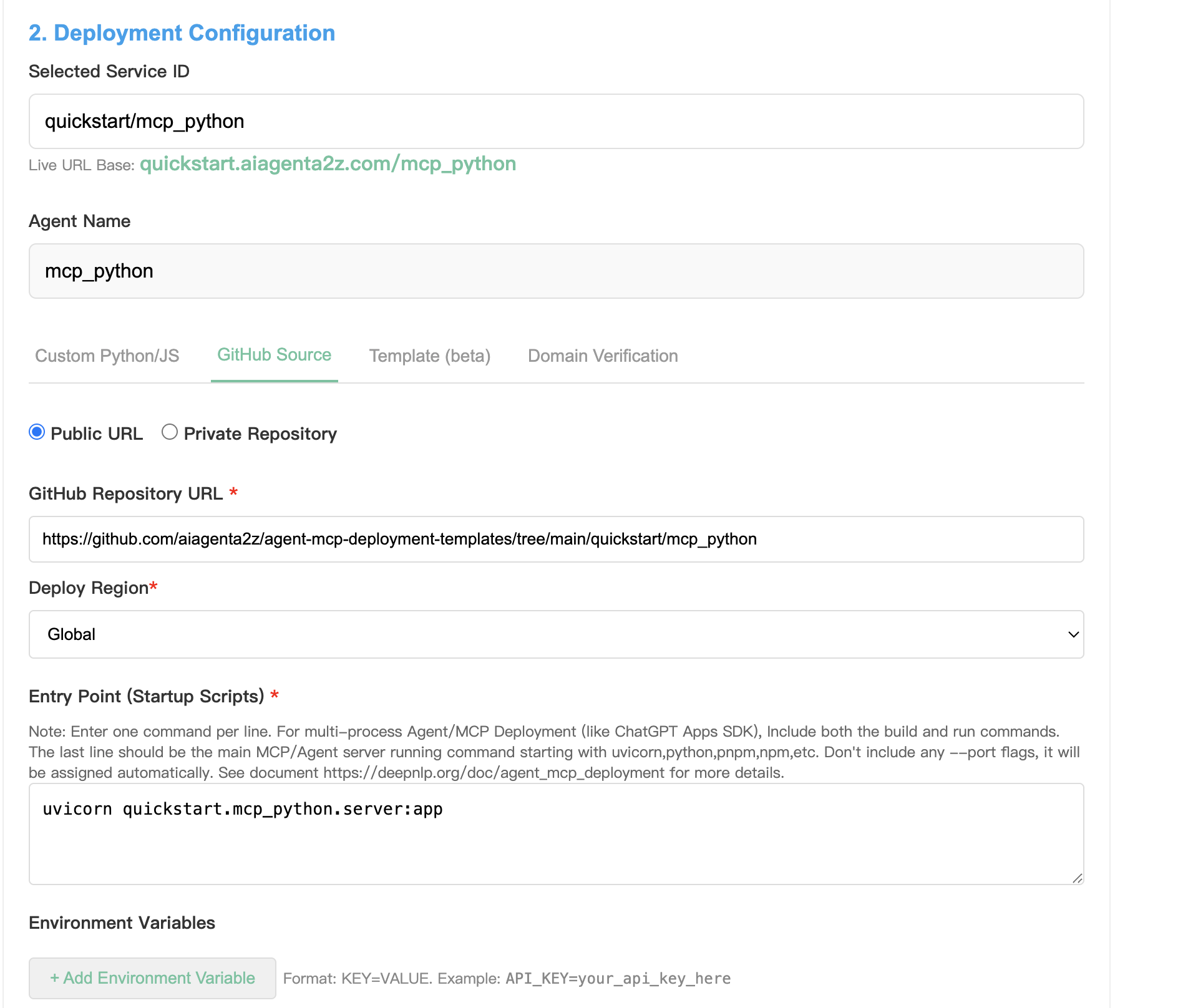 1. Create AI Service at [AI Service Project](https://deepnlp.org/workspace/my_ai_services)
2. Go to [A2Z Deployment Panel](https://deepnlp.org/workspace/deploy)
Choose Github Method
Public URL: https://github.com/aiagenta2z/agent-mcp-deployment-templates/tree/main/quickstart/mcp_python
Entry Point Starting Script:
```commandline
uvicorn quickstart.mcp_python.server:app
```
3. Deploy
Everything will be done in a few minutes and Note that the server starting script should start from the github root folder as module
Result
1. Create AI Service at [AI Service Project](https://deepnlp.org/workspace/my_ai_services)
2. Go to [A2Z Deployment Panel](https://deepnlp.org/workspace/deploy)
Choose Github Method
Public URL: https://github.com/aiagenta2z/agent-mcp-deployment-templates/tree/main/quickstart/mcp_python
Entry Point Starting Script:
```commandline
uvicorn quickstart.mcp_python.server:app
```
3. Deploy
Everything will be done in a few minutes and Note that the server starting script should start from the github root folder as module
Result
 #### Cursor: Add/Greet User
#### Test Local MCP Connection
https://quickstart.aiagenta2z.com/mcp_python/mcp
## Result
Successfuly Logs
```commandline
2026-02-22 12:31:39.694 [info] listResources: Found 0 resources
2026-02-22 12:31:39.694 [info] Found 1 tools, 1 prompts, and 0 resources
2026-02-22 12:31:39.715 [info] Handling GetInstructions action
```
#### Cursor: Add/Greet User
#### Test Local MCP Connection
https://quickstart.aiagenta2z.com/mcp_python/mcp
## Result
Successfuly Logs
```commandline
2026-02-22 12:31:39.694 [info] listResources: Found 0 resources
2026-02-22 12:31:39.694 [info] Found 1 tools, 1 prompts, and 0 resources
2026-02-22 12:31:39.715 [info] Handling GetInstructions action
```