AgentScope x AIAgentA2Z Deep Research Agent Example Deployed Live
AI Agent Marketplace | GitHub | Agent Deployment
This example shows how to deploy the agentscope package deep research agent (tavily search tool/ReAct DeepResearch Agent) and deploy Live on AI Agent A2Z agent open platform. And we can get a live urls which return streaming chunks such as https://agentscope.aiagenta2z.com/deep_research_agent/chat .
Requirements
Deploy From GitHub Source URL: https://github.com/aiagenta2z/agent-mcp-deployment-templates/tree/main/agentscope
Prepare Access Key:
DASHSCOPE_API_KEYandTAVILY_API_KEY, you can see example in AgentScope DeepResearch Example
And that all you need to deploy a live agents on AI Agent A2Z (*.aiagenta2z.com) and expose a /chat endpoint.
Go to Workspace
Vist Workspace: https://deepnlp.org/workspace/deploy Create a new AI Service with unique id, for example “agentscope/deep_research_agent”, and the final live url will be ‘${username}.aiagenta2z.com/${project_name}/chat’
The main.py is the original implementation which takes query and deep research and create a markdown report locally.
And main_server.py is the example we convert the agent to a FastAPI based application and expose the “/chat” endpoint.
Deploy the server
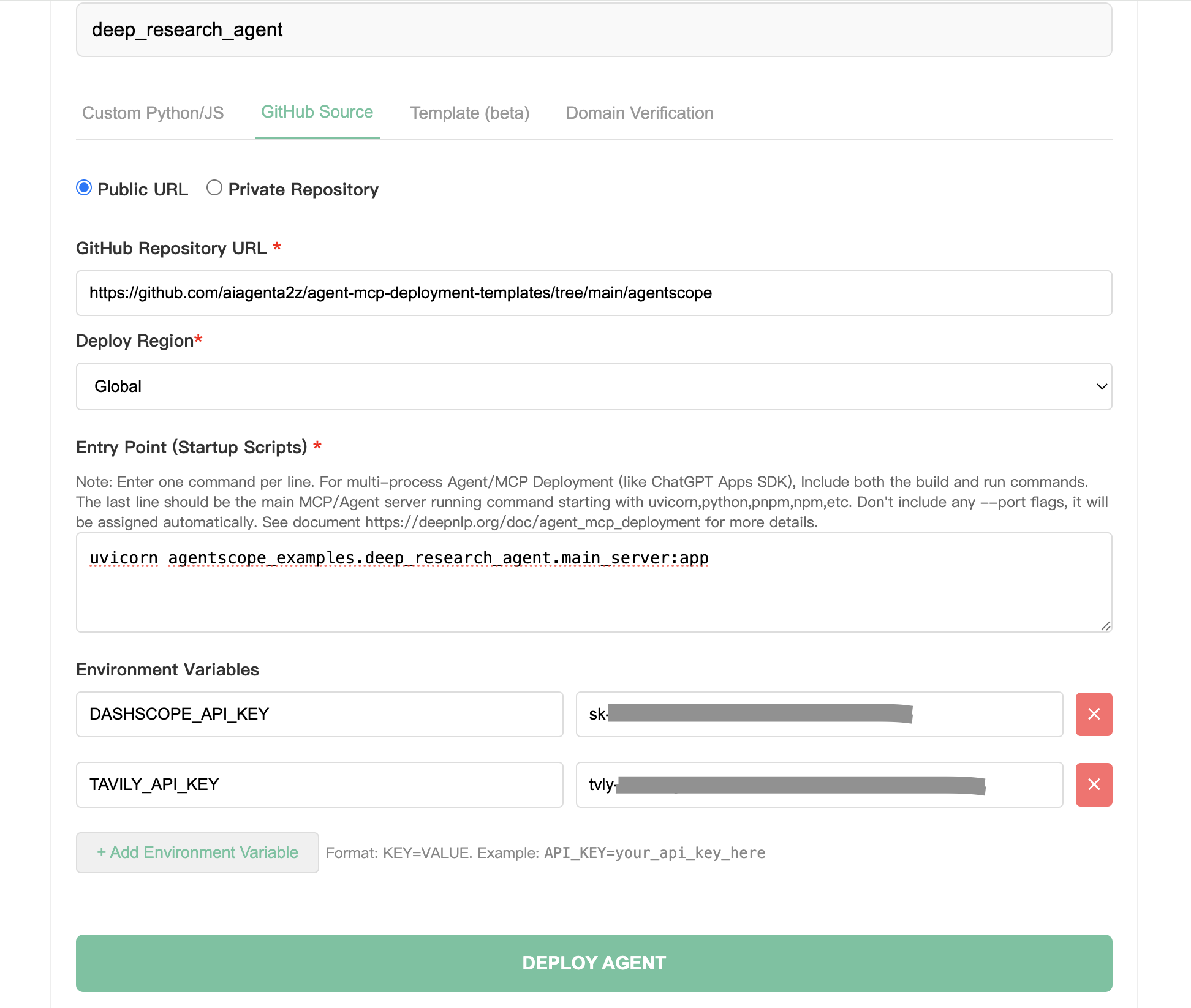
Choose Tab: GitHub Source
GitHub Repository URL: https://github.com/aiagenta2z/agent-mcp-deployment-templates/tree/main/agentscope
Deploy Region: Global
Entry Point (Startup Scripts)
uvicorn agentscope_examples.deep_research_agent.main_server:app
Note that the requirements.txt contains the python package required for deployment. We put below in the requirements.txt. And fastapi and more packages are already build in the runtime so you don’t need to install again every time.
pydantic>=2.12.0
shortuuid>=1.0.13
agentscope>=1.0.0
Environment variable in the input form or as env variables
export DASHSCOPE_API_KEY="your_dashscope_api_key_here"
export TAVILY_API_KEY="your_tavily_api_key_here"
export AGENT_OPERATION_DIR="your_own_direction_here"
Click Deploy!
After you see the log, we can test the live URL
INFO:     Started server process [1]
INFO:     Waiting for application startup.
Application startup...
Tavily MCP server running on stdio
2026-02-11 04:00:19,324 | INFO    | _stateful_client_base:connect:66 - MCP client connected.
Lifecycle closed at the end...
INFO:     Application startup complete.
> SUCCESS: ✅ Deployment Complete!
Test and Connect the Agent
Locally
Before deployment, you can actually start the service on your local machine to save some time.
endpoint: http://localhost:8000/chat
curl -X POST “http://localhost:8000/chat”
-H “Content-Type: application/json”
-d ‘{“messages”:[{“role”:”user”,”content”:”What is difference between MCPs and skills?”}]}’
Expected Result
{"type": "assistant", "format": "text", "content": "{\n \"type\": \"text\",\n \"text\": \"Create and write ./agentscope/examples/agent/deep_research_agent/deepresearch_agent_demo_env/Friday260209165138_detailed_report.md successfully.\"\n}", "section": "answer", "message_id": "5d878be8-82df-4c23-8fa6-564bf745775b", "content_type": "text/markdown", "template": "streaming_content_type", "task_ids": "", "tab_message_ids": "", "tab_id": ""}
Test the deployed Live Agent URL
Live URL with /chat endpoint is live on https://agentscope.aiagenta2z.com/deep_research_agent/chat
And we try to curl to the post the messages as input
curl -X POST "https://agentscope.aiagenta2z.com/deep_research_agent/chat" \
  -H "Content-Type: application/json" \
  -d '{"messages":[{"role":"user","content":"Calculate 1+1 result"}]}'
Wait for a while because the deep research conduct multiple rounds of search be rendering results.
And the Rendered Results
{"type": "assistant", "format": "text", "content": "DeepResearch Task Starting...", "section": "answer", "message_id": "202d21fd-c71b-4a11-ba35-e2cb3c7d5947", "content_type": "text/markdown", "template": "streaming_content_type", "task_ids": "", "tab_message_ids": "", "tab_id": ""}
{"type": "assistant", "format": "text", "content": "{\n  \"type\": \"text\",\n  \"text\": \"Overwrite /app/agentscope_examples/deep_research_agent/deepresearch_agent_demo_env/Friday260211040019_detailed_report.md successfully.\\n# Calculation of 1 + 1: A Foundational Arithmetic Operation\\n\\n## Step 1: Confirming the Context of the Operation\\n\\nThe expression \\\"1 + 1\\\" is interpreted within the standard framework of elementary arithmetic unless otherwise specified. In this context:\\n\\n- The numerals \\\"1\\\" represent the natural number one, which is the first positive integer in the set \u2115 = {1, 2, 3, ...} (or sometimes defined to include 0, depending on convention).\\n- The symbol \\\"+\\\" denotes the binary operation of addition as defined in the Peano axioms for natural numbers or as commonly taught in primary education.\\n- The numeral system assumed is base-10 (decimal), which is the standard positional numeral system used globally for everyday arithmetic.\\n\\nNo alternative interpretations\u2014such as those from Boolean logic, modular arithmetic, or abstract algebra\u2014are indicated in the subtask, so we proceed under the assumption of classical arithmetic in the natural numbers.\\n\\n## Step 2: Performing the Calculation\\n\\nUsing the definition of addition for natural numbers:\\n\\n- By the successor function in Peano arithmetic, the number 2 is defined as the successor of 1, denoted S(1).\\n- Addition is recursively defined such that:\\n  - \\\\( a + 0 = a \\\\)\\n  - \\\\( a + S(b) = S(a + b) \\\\)\\n\\nThus:\\n\\\\[\\n1 + 1 = 1 + S(0) = S(1 + 0) = S(1) = 2\\n\\\\]\\n\\nAlternatively, from empirical and educational foundations:\\n- Counting one object and then adding another yields a total of two objects.\\n- This is consistent across physical, symbolic, and computational representations.\\n\\nTherefore, **1 + 1 = 2**.\\n\\n## Step 3: Validation\\n\\nThis result is universally accepted in standard mathematics and has been formally verified in foundational logical systems. Notably:\\n\\n- In *Principia Mathematica* by Alfred North Whitehead and Bertrand Russell (1910\u20131913), the proposition \\\"1 + 1 = 2\\\" is rigorously derived from set-theoretic and logical axioms. It appears as Proposition \u221754.43 in Volume I, with the actual proof completed in Volume II after hundreds of pages of preliminary logic. While famously taking over 300 pages to reach, this underscores the depth of formal verification possible\u2014even for seemingly trivial statements.\\n\\n- Modern computational systems (e.g., calculators, programming languages like Python, MATLAB, or Wolfram Language) all return `2` when evaluating `1 + 1`.\\n\\n- Educational curricula worldwide introduce this as the first non-trivial addition fact, reinforcing its role as a cornerstone of numerical literacy.\\n\\n## Conclusion\\n\\nUnder standard arithmetic in the base-10 numeral system, using the conventional meaning of numerals and the addition operator, the expression **1 + 1 evaluates unequivocally to 2**. This result is mathematically sound, logically consistent, empirically verifiable, and computationally confirmed.\\n\\n**Final Answer: 2**\"\n}", "section": "answer", "message_id": "My5UpF5iRxcWbyooMHqogZ", "content_type": "text/markdown", "template": "streaming_content_type", "task_ids": "", "tab_message_ids": "", "tab_id": ""}
#—— Original AgentScope Example ——-
What This Example Demonstrates
This example shows a DeepResearch Agent implementation using the AgentScope framework. The DeepResearch Agent specializes in performing multi-step research to collect and integrate information from multiple sources, and generates comprehensive reports to solve complex tasks.
Prerequisites
Python 3.10 or higher
Node.js and npm (for the MCP server)
DashScope API key from Alibaba Cloud
Tavily search API key from Tavily
How to Run This Example
Set Environment Variable:
export DASHSCOPE_API_KEY="your_dashscope_api_key_here"
export TAVILY_API_KEY="your_tavily_api_key_here"
export AGENT_OPERATION_DIR="your_own_direction_here"
Test Tavily MCP Server:
npx -y tavily-mcp@latest
Run the script:
python main.py
Connect to Web Search MCP client
The DeepResearch Agent only supports web search through the Tavily MCP client currently. To use this feature, you need to start the MCP server locally and establish a connection to it.
from agentscope.mcp import StdIOStatefulClient

tavily_search_client= StdIOStatefulClient(
    name="tavily_mcp",
    command="npx",
    args=["-y", "tavily-mcp@latest"],
    env={"TAVILY_API_KEY": os.getenv("TAVILY_API_KEY", "")},
)
await tavily_search_client.connect()
Note: The example is built with DashScope chat model. If you want to change the model in this example, don’t forget to change the formatter at the same time! The corresponding relationship between built-in models and formatters are list in our tutorial