LangChain DeepAgents x AI Agent A2Z Deploy LangChain Examples Live
Website | GitHub | AI Agent Marketplace | AI Agent A2Z
This guide shows how to convert a LangChain DeepAgents into a production-ready live service using BaseLiveRuntime from ai-agent-marketplace
The runtime wraps your agent and exposes a FastAPI streaming /chat endpoint automatically.
QuickStart
from ai_agent_marketplace.runtime.base import *

async def deepagents_stream_generator(agent: Any, user_query: str, **kwargs) -> AsyncGenerator[str, None]:
    """
    Universal async adapter
    """
    initial_content = "Task Started..."
    initial_chunk = json.dumps(assembly_message())
    ###
    yield initial_chunk + STREAMING_SEPARATOR_DEFAULT

runtime = BaseLiveRuntime(
    agent=agent,
    stream_handler=deepagents_stream_generator
)

## Returned a FastAPI based app with /chat endpoint
app = runtime.app
Run the Server
Set the Environment Variables
# Set API keys
export GOOGLE_API_KEY="..."      # For image generation
export TAVILY_API_KEY="..."      # For web search (optional)
Entry Point Command shell
uvicorn langchain_deepagents.deep_research.research_agent_server:app
🚀 Architecture Summary
LangChain Agent
        ↓
Streaming Adapter (Async Generator)
        ↓
BaseLiveRuntime
        ↓
FastAPI App (/chat)
        ↓
Streaming JSON Response
2️⃣ Create a Streaming Adapter
Define an async generator that adapts your LangChain agent output into streaming chunks.
The async generator takes in two parameters: agent an customized agent object, user_query
that are parsed from the messages object from the “\chat” endpoints.
In the async generator, the agent calls agent.invoke({"messages": messages}) methods.
from ai_agent_marketplace.runtime.base import *
from typing import Any, AsyncGenerator
import json
import uuid
import asyncio

async def deepagents_stream_generator(
    agent: Any,
    user_query: str,
    **kwargs
) -> AsyncGenerator[str, None]:
    """
    Universal async adapter for LangChain agent
    """

    # Send initial streaming message
    initial_content = "Task Started and Research Take a Few Minutes"
    initial_chunk = json.dumps(
        assembly_message(
            type=MESSAGE_TYPE_ASSISTANT,
            format=OUTPUT_FORMAT_TEXT,
            content=initial_content,
            content_type=CONTENT_TYPE_MARKDOWN,
            section=SECTION_ANSWER,
            message_id=str(uuid.uuid4()),
            template=TEMPLATE_STREAMING_CONTENT_TYPE,
        )
    )

    yield initial_chunk + STREAMING_SEPARATOR_DEFAULT
    await asyncio.sleep(0)

    try:
        # Call LangChain agent
        messages = [{"role": "user", "content": user_query}]
        result = agent.invoke({"messages": messages})

        output_messages = result["messages"] if "messages" in result else []

        for message in output_messages:
            message_id, content, role = extract_message_content_langchain(message)

            output_chunk = json.dumps(
                assembly_message(
                    type=MESSAGE_TYPE_ASSISTANT,
                    format=OUTPUT_FORMAT_TEXT,
                    content=content,
                    content_type=CONTENT_TYPE_MARKDOWN,
                    section=SECTION_ANSWER,
                    message_id=message_id,
                    template=TEMPLATE_STREAMING_CONTENT_TYPE,
                )
            )

            yield output_chunk + STREAMING_SEPARATOR_DEFAULT

    except Exception:
        yield json.dumps({}) + STREAMING_SEPARATOR_DEFAULT
3️⃣ Wrap the Agent with Runtime
runtime = BaseLiveRuntime(
    agent=agent,
    stream_handler=deepagents_stream_generator
)

# FastAPI app with /chat endpoint
app = runtime.app
That’s it.
You now have a production-ready FastAPI service.
Deploy the Server
Step 1. Choose Github Tab Step 2. Public url: https://github.com/aiagenta2z/agent-mcp-deployment-templates Step 3. Entry Point Command shell
uvicorn langchain_deepagents.deep_research.research_agent_server:app
Step 4.
Set the Environment Variables
# Set API keys
export GOOGLE_API_KEY="..."      # For image generation
export TAVILY_API_KEY="..."      # For web search (optional)
Step 5. Click Deploy and You will get the URL
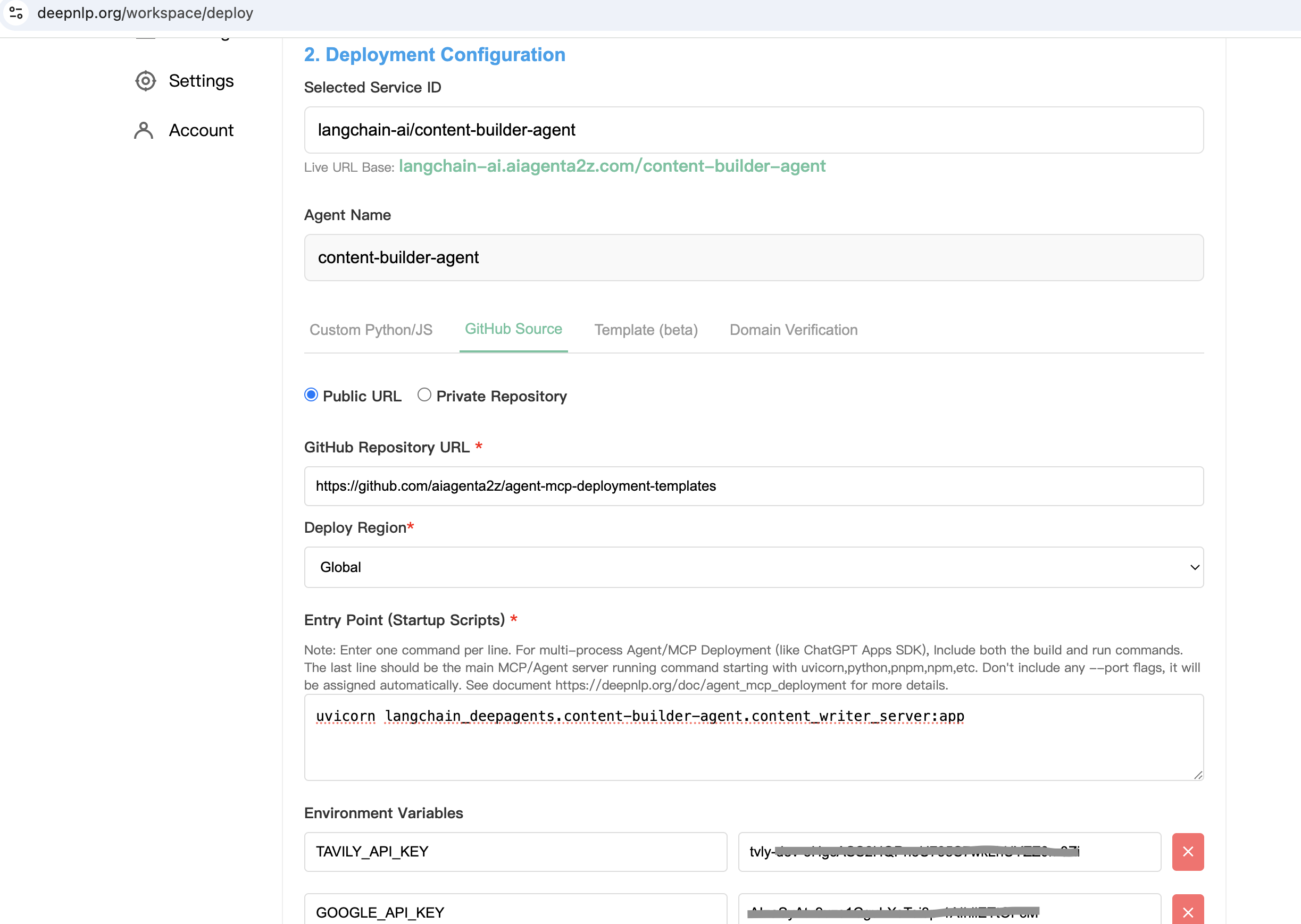
Get the Product /chat POST URL :
https://langchain-ai.aiagenta2z.com/deep_research/chat
Server will run at:
http://localhost:8000
5️⃣ Test with curl
Case 1: Simple Math
curl -X POST "http://localhost:8000/chat" \
  -H "Content-Type: application/json" \
  -d '{"messages":[{"role":"user","content":"Calculate 1+1 result"}]}'
Sample Streaming Output
{"type":"assistant","format":"text","content":"Task Started...","section":"answer","message_id":"670d3458-a539-406f-a786-1afc0f0fc201","content_type":"text/markdown","template":"streaming_content_type"}
{"type":"assistant","format":"text","content":"Calculate 1+1 result","section":"answer","message_id":"701be311-37e3-4ee1-9519-6d8e65b47f59","content_type":"text/markdown","template":"streaming_content_type"}
{"type":"assistant","format":"text","content":"1 + 1 = 2","section":"answer","message_id":"lc_run--019c55fe-4ed2-7da3-9e05-0a8758aa10cc-0","content_type":"text/markdown","template":"streaming_content_type"}
Case 2: Research Task
curl -X POST "http://localhost:8000/chat" \
  -H "Content-Type: application/json" \
  -d '{"messages":[{"role":"user","content":"research context engineering approaches used to build AI agents"}]}'
Sample Streaming Output (Truncated)
{"type":"assistant","content":"Task Started..."}
{"type":"assistant","content":"Updated todo list ..."}
{"type":"assistant","content":"Updated file /research_request.md"}
{"type":"assistant","content":"Here is a comprehensive report on context engineering approaches..."}
The response is streamed incrementally as the agent reasons, calls tools, and produces final output.
🌐 Deploy Example
You can also deploy publicly:
curl -X POST "https://deepagents.aiagenta2z.com/deep_research/chat" \
  -H "Content-Type: application/json" \
  -d '{"messages":[{"role":"user","content":"Calculate 1+1 result"}]}'
✅ What You Get
Automatic
/chatendpointStreaming JSON output
LangChain message compatibility
Standardized message schema
Ready for UI integration
Production-ready FastAPI server
🚀 Deep Research
🚀 Quickstart
Prerequisites: Install uv package manager:
curl -LsSf https://astral.sh/uv/install.sh | sh
Ensure you are in the deep_research directory:
cd examples/deep_research
Install packages:
uv sync
Set your API keys in your environment:
export ANTHROPIC_API_KEY=your_anthropic_api_key_here  # Required for Claude model
export GOOGLE_API_KEY=your_google_api_key_here        # Required for Gemini model ([get one here](https://ai.google.dev/gemini-api/docs))
export TAVILY_API_KEY=your_tavily_api_key_here        # Required for web search ([get one here](https://www.tavily.com/)) with a generous free tier
export LANGSMITH_API_KEY=your_langsmith_api_key_here  # [LangSmith API key](https://smith.langchain.com/settings) (free to sign up)
Usage Options
You can run this example in two ways:
Option 1: Jupyter Notebook
Run the interactive notebook to step through the research agent:
uv run jupyter notebook research_agent.ipynb
Option 2: LangGraph Server
Run a local LangGraph server with a web interface:
langgraph dev
LangGraph server will open a new browser window with the Studio interface, which you can submit your search query to:
You can also connect the LangGraph server to a UI specifically designed for deepagents:
git clone https://github.com/langchain-ai/deep-agents-ui.git
cd deep-agents-ui
yarn install
yarn dev
Then follow the instructions in the deep-agents-ui README to connect the UI to the running LangGraph server.
This provides a user-friendly chat interface and visualization of files in state.
📚 Resources
Deep Research Course - Full course on deep research with LangGraph
Custom Model
By default, deepagents uses "claude-sonnet-4-5-20250929". You can customize this by passing any LangChain model object. See the Deep Agents package README for more details.
from langchain.chat_models import init_chat_model
from deepagents import create_deep_agent

# Using Claude
model = init_chat_model(model="anthropic:claude-sonnet-4-5-20250929", temperature=0.0)

# Using Gemini
from langchain_google_genai import ChatGoogleGenerativeAI
model = ChatGoogleGenerativeAI(model="gemini-3-pro-preview")

agent = create_deep_agent(
    model=model,
)
Custom Instructions
The deep research agent uses custom instructions defined in research_agent/prompts.py that complement (rather than duplicate) the default middleware instructions. You can modify these in any way you want.
Instruction Set |
Purpose |
|---|---|
|
Defines the 5-step research workflow: save request → plan with TODOs → delegate to sub-agents → synthesize → respond. Includes research-specific planning guidelines like batching similar tasks and scaling rules for different query types. |
|
Provides concrete delegation strategies with examples: simple queries use 1 sub-agent, comparisons use 1 per element, multi-faceted research uses 1 per aspect. Sets limits on parallel execution (max 3 concurrent) and iteration rounds (max 3). |
|
Guides individual research sub-agents to conduct focused web searches. Includes hard limits (2-3 searches for simple queries, max 5 for complex), emphasizes using |
Custom Tools
The deep research agent adds the following custom tools beyond the built-in deepagent tools. You can also use your own tools, including via MCP servers. See the Deep Agents package README for more details.
Tool Name |
Description |
|---|---|
|
Web search tool that uses Tavily purely as a URL discovery engine. Performs searches using Tavily API to find relevant URLs, fetches full webpage content via HTTP with proper User-Agent headers (avoiding 403 errors), converts HTML to markdown, and returns the complete content without summarization to preserve all information for the agent’s analysis. Works with both Claude and Gemini models. |
|
Strategic reflection mechanism that helps the agent pause and assess progress between searches, analyze findings, identify gaps, and plan next steps. |