Agent A2Z Payment SDK - AI AGENT A2Z x DEEPNLP
Website | GitHub | Playground | AI Agent Marketplace | AI Agent A2Z
AgentA2Z Payment SDK by AI Agent A2Z (aiagenta2z.com) x DeepNLP (deepnlp.org) agent-a2z-paymentcan help you integrate various payment methods (Stripe,Paypal,Alipay,WeChat) into your agent workflow and you
can define when and where to charge money or create an order with remote DB (AI Agent A2Z/DeepNLP API Credit) in the workflow.
Features
SDK Function - Payment Agent
Support Various Payment Method Integration (Stripe/Paypal/Alipay/WeChat/AgentA2Z) and environment (sandbox/production)
Different payment scenario and workflow, such as Cost-Based Consumption, Preview-to-Pay, Post-Workflow Tip (Tipping/Send Red Envelops), E-Commerce Checkout
Create_Order, Checkout, Accept Webhook for notification in one SDK
Customized Checkout Styles and JS, You can provide your own checkout styles, css, js files, etc.
SDK Function - Billing Agent
Add/Delete/Update/Select records/transactions. You can simply add a bill by saying ”Breakfast Peets Coffee 2.99, AT&T phone $55.0, souvenir “
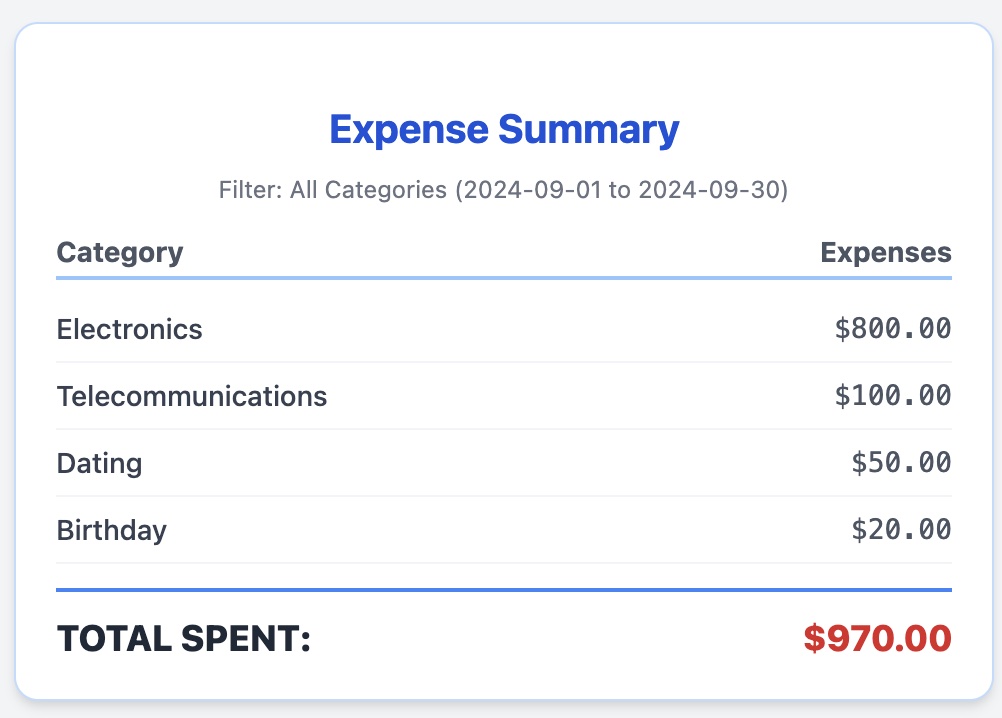
Select Bill Summary Report By various duration (start_date, end_date), month, weeks, and category, etc. You can ask ‘How much did I spend on Food Last month?’
Use Case 1 AgentA2ZPayment Checkout Integration
Sandbox Web Playground You can use Stripe/Paypal/Alipay/WeChat sandbox test account to complete the payment and see the webhook notification
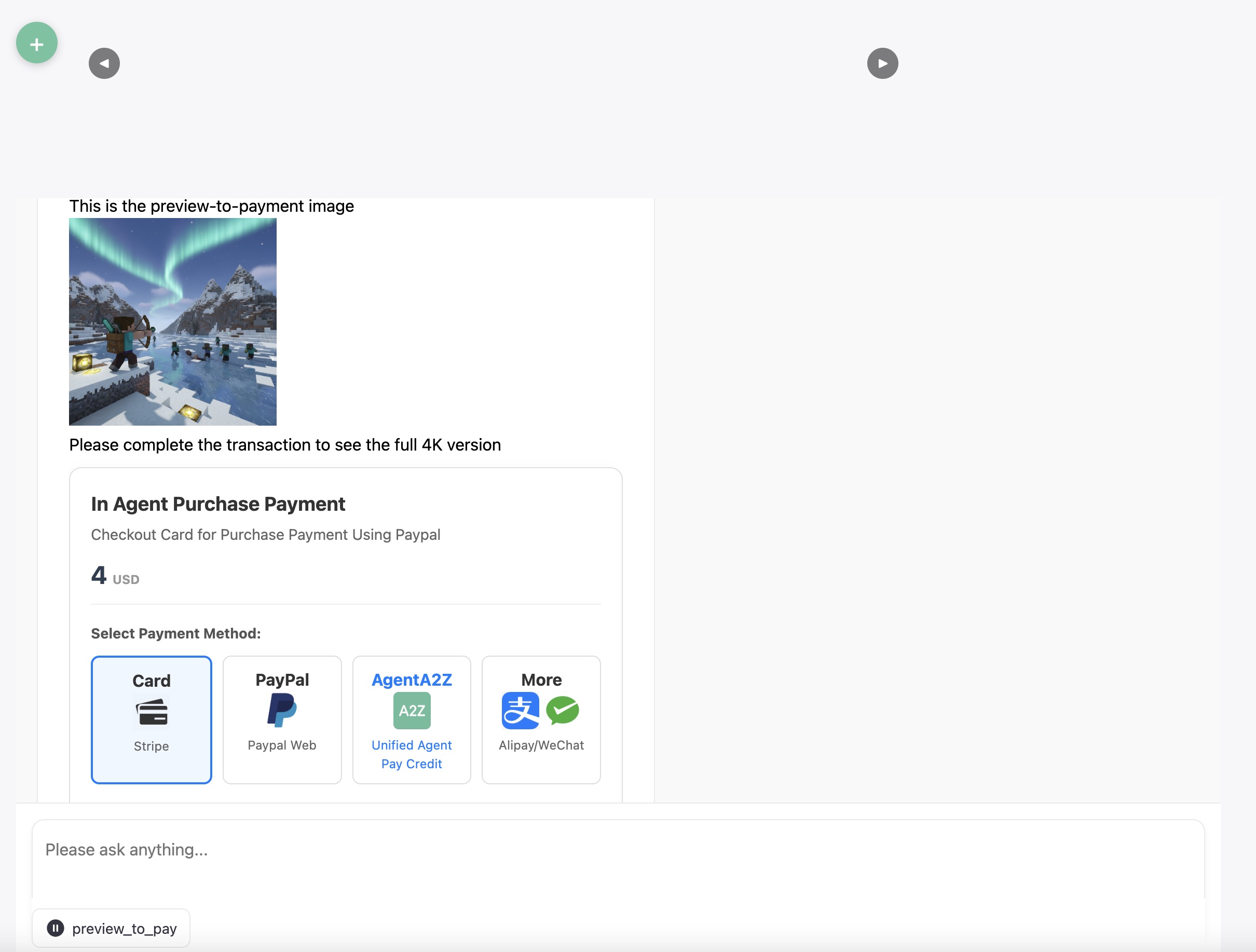
Preview-to-Pay
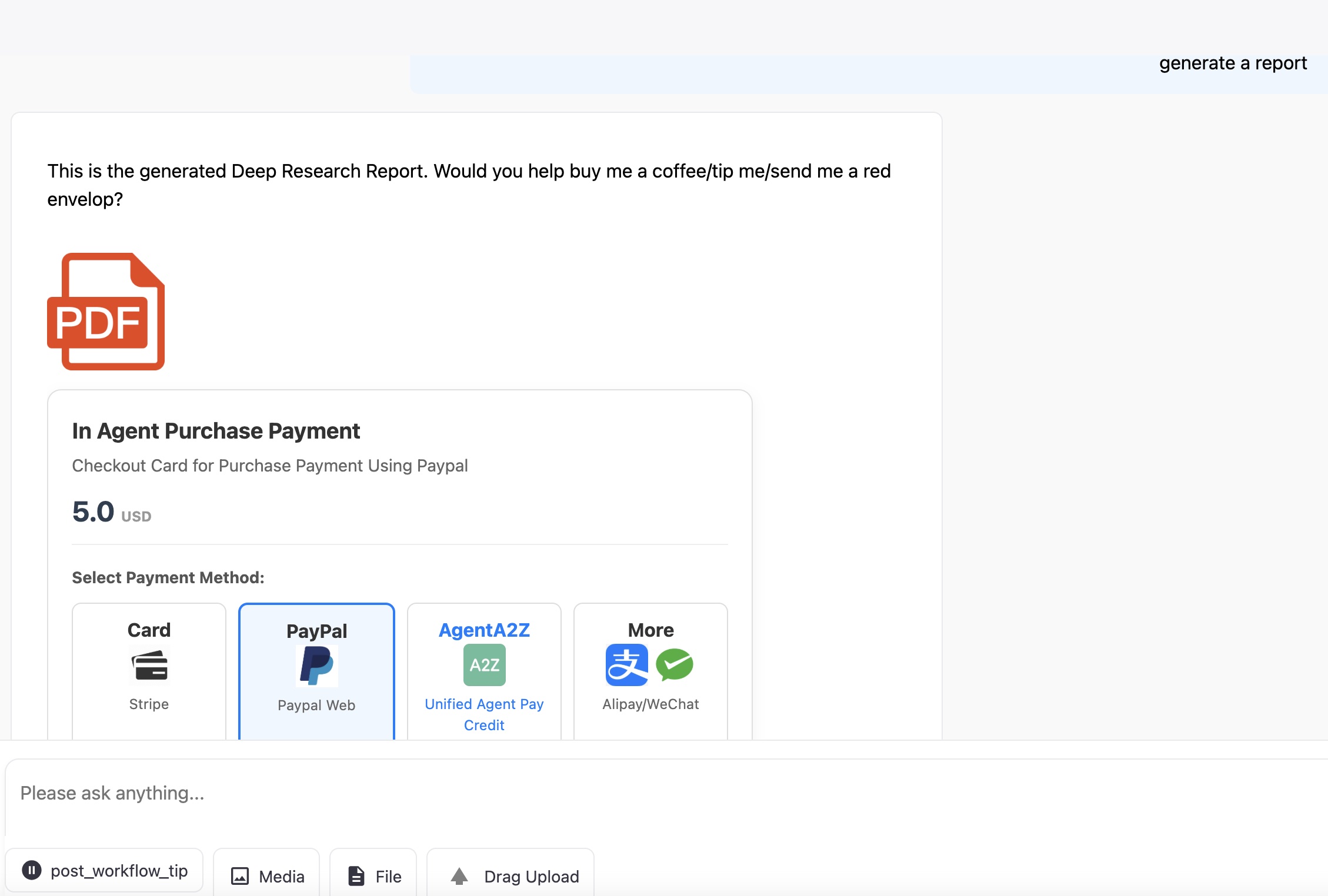
Post-Workflow Tip
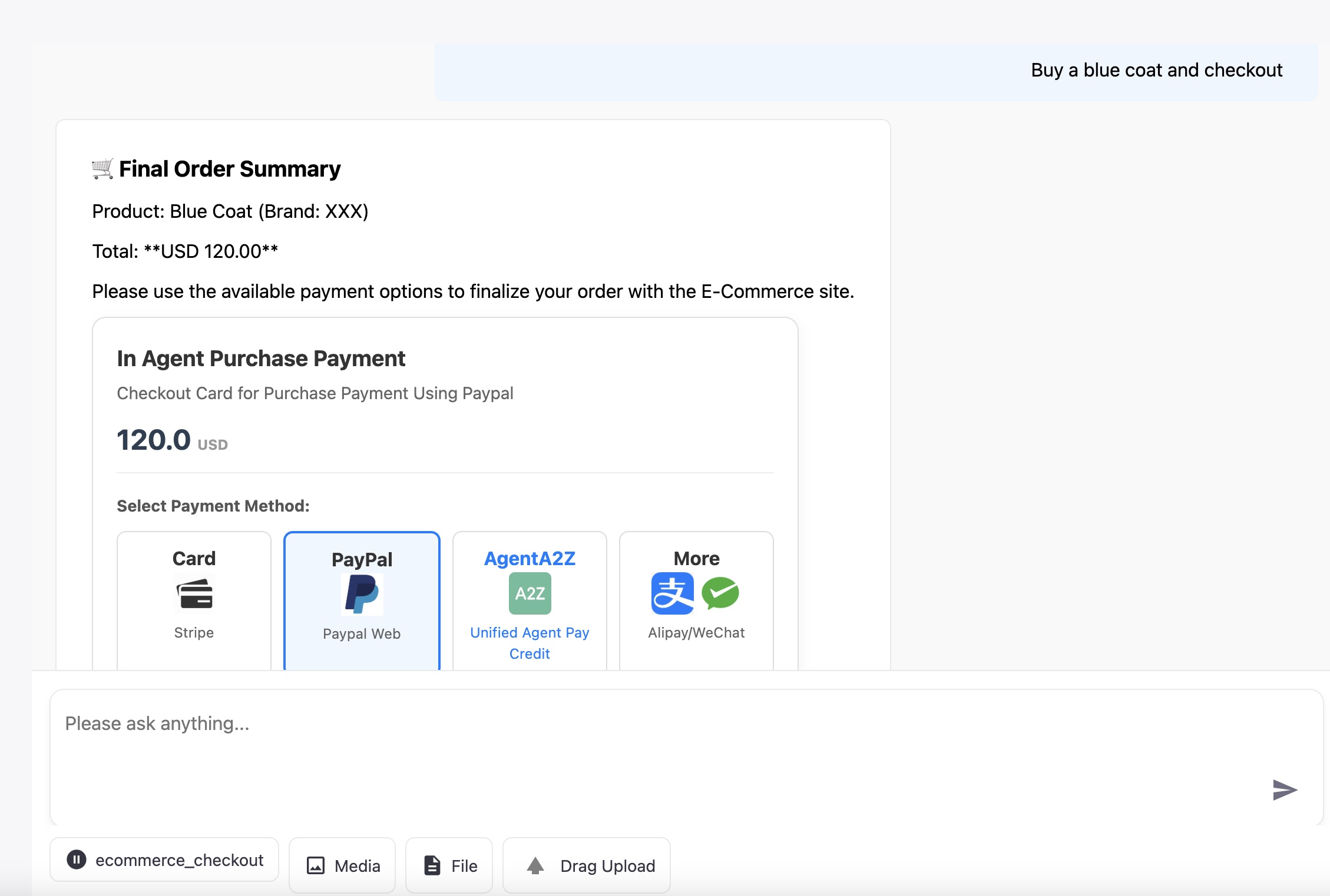
E-Commerce Checkout
Workflow Integration
Flow Name |
Core Logic |
Description |
|---|---|---|
Cost-Based Consumption |
Gated Content Calculate Estimated Cost (tokens/images) $\to$ Payment (Required) $\to$ LLM completion |
Calculates a cost based on estimated resources estimated to run the task/LLM. Payment is at the beginning of the workflow and required |
Preview-to-Pay |
Gated Content. LLM/Agent Completion $\to$ Preview $\to$ Payment (Required) $\to$ Final Content. |
Shows a low-resolution preview/summary of the content, like and image or first page of a report, then charges for the full, high-value version. |
Post-Workflow Tip |
Ungated Content. LLM completion $\to$ Final Output $\to$ Payment (Voluntary Tip Request) |
The agent delivers the full, high-value content first, then presents an optional tipping card. |
E-Commerce Checkout |
Gated Transaction. Cart Summary $\to$ Payment $\to$ Transaction Confirmation. |
Agent guides the user to a final cart summary and provides payment options for a large transaction. |
Payment Options
Platform |
URL |
|---|---|
Credit Card |
Supported Credit Card using the Stripe Python Integration, including the checkout, webhook |
Stripe |
Supported, For Stripe Sandbox/Live PK, SK, Webhook Secret definition, see Stripe Doc |
PayPal |
Supported, For Client ID, Secret and Webhook ID, See Doc Paypal Doc |
AgentA2Z Pay |
WIP, Payment using API credit by AI AGENT A2Z Agent Platform / DeepNLP OneKey MCP & Agent API credit, OneKey Router Website and Doc OneKey Router API Benifits |
Alipay |
WIP, See Alipay Developer Doc |
WeChat Pay |
WIP, See WeChat Pay Developer Doc |
Supported Environment
Platform |
URL |
|---|---|
Python |
Pypi |
NodeJs |
NodeJS |
Brief Introduction of Different Payment Process
Stripe: Requires two steps: Create Payment Intent return a client_secret, Start Payment in the Client Side and then finish payment, Post Web Hook on
PayPal: Requires two steps: Create Order (server-side, returns approval_link) and Capture Order (server-side, after user approval/return).
Agent A2Z Payment: Requires one step of unified credit deduction A2Z Payment on aiagenta2z.com/deepnlp.org right after payment confirmation
Alipay/WeChat Pay: Requires one step: Unified Order/Create Payment (server-side, returns QR Code URL). Payment is completed via webhook after the user scans the code.
Use Case 2: A2Z Bill Agent
Features:
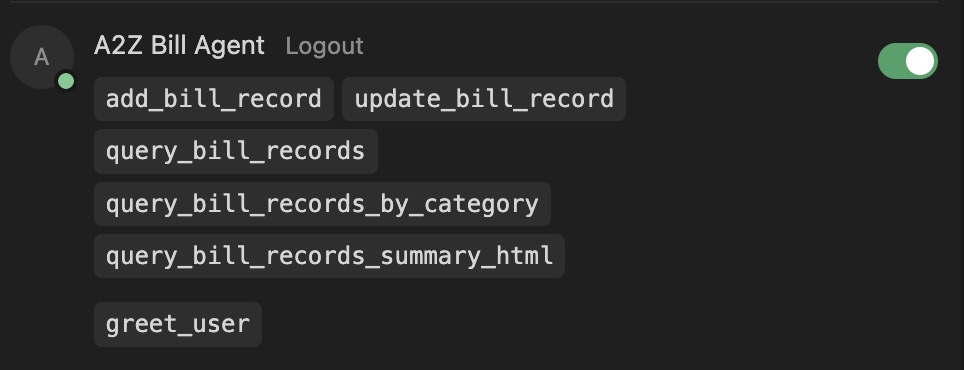
A2Z Bill Agent can track every single bills and By Your Bill Assistant
You can ask your expenses by category and start/end date, such as : How much did I spend on Food Last month?
Giving you advice on how to save more money
ChatGPT Apps
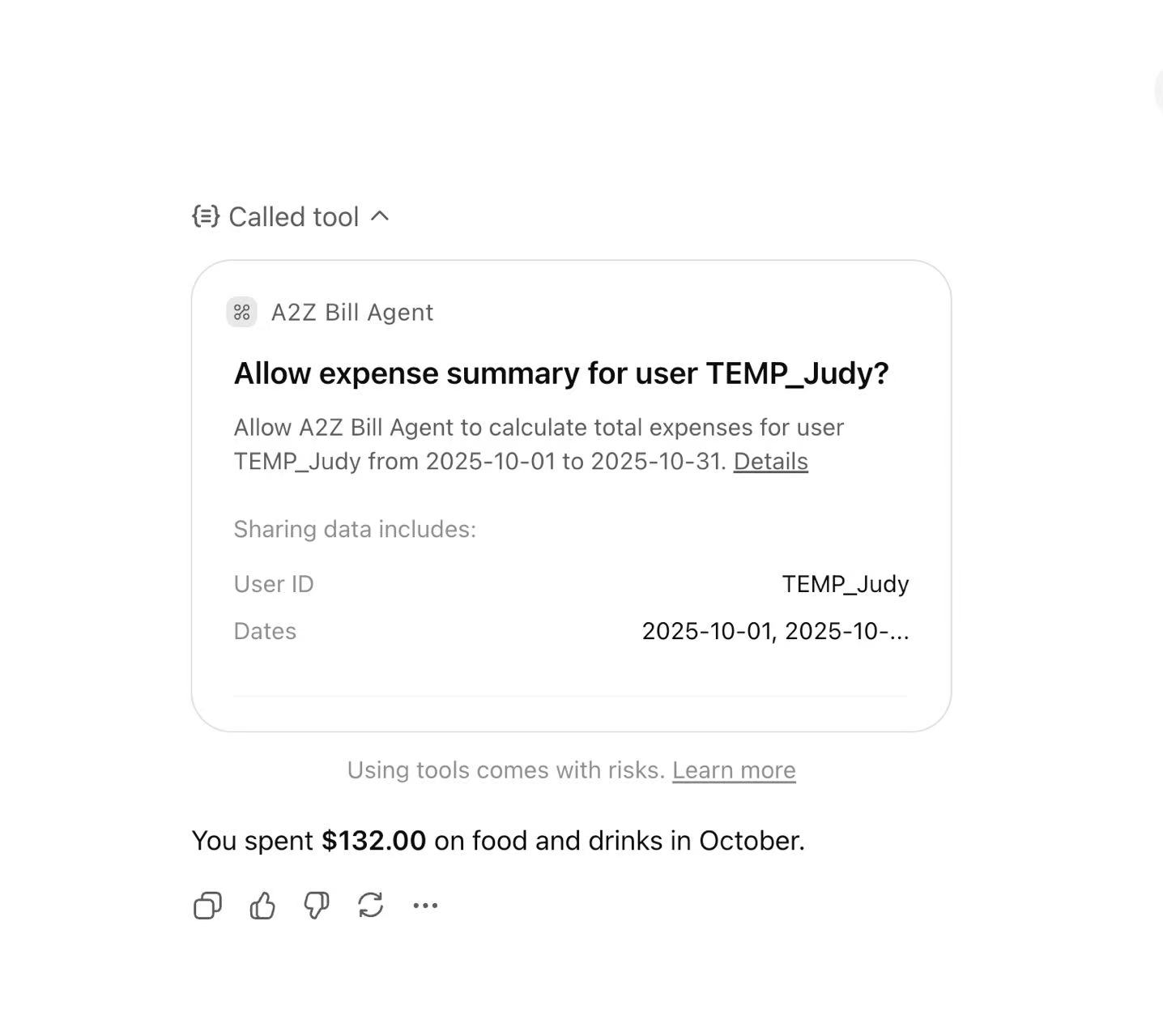
Cursor User
Bill Agent Summary Report
Tutorial
Tutorial 1. Agent Payment Checkout
Let’s begin with a workflow that charge user per tokens consumed, Example will charge $4. If user pays successfully, the agent loop will continue and return more things, otherwise it will await till timeout and return a checkout fail card.
Register Your AgentA2Z Payment Access Key at AgentA2ZPayment SDK Access Key Registry
Run complete app example at In Agent Purchase SDK
Install
pip install agent-a2z-payment
import agent_a2z_payment
import uuid
from agent_a2z_payment.core import get_payment_sdk, PaymentWaitingMode, Environment
from agent_a2z_payment.core import _get_paypal_access_token


environment = Environment.SANDBOX.value
payment_agent = get_payment_sdk(env=environment)


### Define server endpoint, e.g., using FastAPI: @app.post("/api/chat")
async def chat(messages: list = Body(...)
               , kwargs: dict = Body(...)):

    # 0. Process input and initialize
    print (f"DEBUG: Input messages: {messages} kwargs: {kwargs}")

    # 1. LLM/Agent decides the cost of the task (e.g., 0.5 dollars for a report)
    ### Replace with actual logic to determine the required payment amount and currency.
    ### e.g.   output = payment_agent.calculate_payment(messages)
    amount = 1.00 # Example amount
    currency = "USD"
    print (f"Payment Agent calculated required amount: {amount} {currency}")

    # 2. Create an order and prepare for asynchronous waiting
    order = payment_agent.create_order(amount, currency)
    order_id = order.get("order_id", str(uuid.uuid4()))

    # 3. Create payment intent and get the checkout card HTML/JS
    ## payment_method: all,stripe,paypal,agenta2z,alipay,wechat,etc
    checkout_result = payment_agent.checkout(payment_method="all", order_id=order_id, amount=amount, currency=currency)
    checkout_html = checkout_result.get("checkout_html", "")
    checkout_js = checkout_result.get("checkout_js", "")

    ### code to format the HTML/JS for streaming back to the front-end
    # message_id  = get_new_message_id()
    ## Yield back the checkout_html and checkout_js
    ## Omitted

    # 4. Generator function to wait for payment and stream the final response
    generator = payment_stream_generator(
        order_id, message_id, chunk_list, payment_agent.orders
    )

    return StreamingResponse(generator, media_type="text/event-stream")

@app.post("/stripe/webhook")
async def stripe_webhook(request: Request):
    ### STRIPE WEBHOOK IMPLEMENTATION
    ### - Verify the signature (Stripe-Signature header).
    ### - Handle event types (e.g., 'checkout.session.completed', 'payment_intent.succeeded').


@app.post("/paypal/webhook")
async def paypal_webhook(request: Request):
    ### PAYPAL WEBHOOK IMPLEMENTATION
    ### - Verify the authenticity of the webhook sender.
    ### - Handle the relevant payment completion event.
    ### - Signal the waiting agent workflow as done in the Stripe webhook.
Remember to put necessary Environment Keys in .env file.
STRIPE_API_KEY_PK_TEST=pk_test_xxxx
STRIPE_API_KEY_SK_TEST=sk_test_xxxx
STRIPE_API_KEY_PK_LIVE=pk_xxxx
STRIPE_API_KEY_SK_LIVE=sk_xxxx
STRIPE_WEBHOOK_SECRET=xxxx

PAYPAL_CLIENT_ID_TEST=xxxx
PAYPAL_SECRET_TEST=xxxx
PAYPAL_CLIENT_ID_LIVE=xxxx
PAYPAL_SECRET_LIVE=xxxx
PAYPAL_WEBHOOK_ID=xxxx

AGENT_A2Z_API_KEY_TEST=a2zt_xxxxxxxx
AGENT_A2Z_API_KEY_LIVE=a2zl_xxxxxxxx
Tutorial 2. Bill Agent to Track Your Daily Expenses
Bill Agent Allows to Add Daily Transaction
import a2z_payment_agent
from a2z_payment_agent import BillAgent

def init_bill_agent():
    """

    :return:
    """
    import a2z_payment_agent
    from a2z_payment_agent import BillAgent
    # Initialize the A2ZPaymentAgent
    agent = BillAgent(db_folder="./", db_name="a2z_billagent.db")
    print("--- Initialized A2ZPaymentAgent Database ---")

    # Clear previous data for clean run (optional)
    ## agent.cursor.execute("DELETE FROM transactions;")
    # agent.conn.commit()
    print("Previous records cleared.")

    # 1. Add Records (Interface 1)
    # Adding data for two different months/weeks to test queries
    user_id = "TEMP_123"
    coffee_id = agent.add_bill_record(user_id,2.99, "USD", 'Coffee', 'Morning coffee', '2025-11-20')
    lunch_id = agent.add_bill_record(user_id,11.50, "USD", 'Food', 'Mexican Food lunch', '2025-11-20')
    transport_id = agent.add_bill_record(user_id,5.00, "USD", 'Transport', 'Subway ticket', '2025-11-25')
    groceries_id = agent.add_bill_record(user_id,45.50, "USD", 'Food', 'Weekly groceries', '2025-12-01')  # Next month

    print(f"\nAdded records (IDs: {coffee_id}, {lunch_id}, {transport_id}, {groceries_id})")

    # 2. Modify Record (Interface 2)
    success_update = agent.update_bill_record(user_id=user_id, record_id=lunch_id, amount=10.00)
    print(f"Updated Lunch Record (ID: {lunch_id}) to $10.00: {success_update}")

    # 3. Delete Record (Interface 3)
    success_delete = agent.delete_bill_record(user_id=user_id, record_id=coffee_id)
    print(f"Deleted Coffee Record (ID: {coffee_id}): {success_delete}")

    # 4. Query Records (Interface 4)

    # Query by Month (e.g., November 2025)
    print("\n--- Query by Month (November 2025) ---")
    start_m, end_m = agent.get_date_range('Month', year=2025, month=11)

    month_records = agent.query_bill_records(user_id=user_id,start_date=start_m, end_date=end_m)
    for record in month_records:
        print(
            f"Date: {record['date']}, Amount: ${record['amount']:.2f}, Category: {record['category']}, Desc: {record['description']}")

    # Summary by Category for November
    print("\n--- Summary by Category (November 2025) ---")
    category_summary = agent.query_bill_records_by_category(user_id=user_id, start_date=start_m, end_date=end_m)
    for summary in category_summary:
        print(f"Category: {summary['category']}, Total: ${summary['total_amount']:.2f}")

    ## set theme
    bill_html_card = agent.query_bill_records_by_category_summary_html(user_id, start_date=start_m, end_date=end_m, category='Coffee', theme='warm')
    print (f"DEBUG: bill_html_card")
    print (f"{bill_html_card}")

    agent.close()
    print("\n--- Database Connection Closed ---")
Tutorial 3. In Agent Payment Workflow
Payment Scenario Integration SDK
Preview-to-Pay
Example: prompt: Can you help me generate a 4K xxxx images? Assistant: This is preview of generated image (preview_image). Please proceed to checkout to see the 4k full resolution of Image, for 1 image for xxx cents or xxx credits.
Description: This scenario is about gating high-value content. The user is allowed to preview a generated asset (the low-resolution image) to confirm its quality and relevance. The system then requires an immediate payment or credit deduction before it completes the final, high-cost rendering of the desired 4K resolution image. This minimizes wasted computational resources on unwanted outputs.
# examples/preview_to_pay.py
import json
import uuid
import asyncio
from typing import Dict, Any, List

# Assuming these are available from the main app environment
from constants import *
from utils import assembly_message, get_new_message_id

async def run_preview_to_pay_loop(
        messages: List[Dict],
        kwargs: Dict[str, Any],
        payment_agent: Any,  # Mocking the type for simplicity
        payment_stream_generator: Any,
        default_amount: float = 1.00,
        default_currency: str = "USD"
):
    """
    Implements the Preview-to-Pay workflow.
    1. Determine cost (e.g., $1.00 for the full 4K image).
    2. Stream the preview HTML.
    3. Stream the payment card HTML/JS.
    4. Start the payment_stream_generator to wait for the webhook.
    """
    # 1. LLM/Agent determines the cost
    # For demo: hardcode the price for the 4K image
    amount = default_amount
    currency = default_currency
    amount = MIN_PAYMENT_AMOUNT_USD if amount < MIN_PAYMENT_AMOUNT_USD else amount

    # 2. Prepare the preview content
    message_id = get_new_message_id()
    preview_html = f'<div><div>This is the preview-to-payment image</div><img src="{PRODUCTION_URL_PREFIX}/static/img/preview_minecraft.png" style="width:200px"></img><br><div>Please complete the transaction to see the full 4K version</div></div>'

    preview_chunk = json.dumps(
        assembly_message("assistant", OUTPUT_FORMAT_HTML, preview_html, content_type=CONTENT_TYPE_HTML,
                         section="", message_id=message_id, template=TEMPLATE_STREAMING_CONTENT_TYPE))

    # 3. Create order and payment intent (server-side)
    order = payment_agent.create_order(amount, currency)
    order_id = order.get(ORDER_ID, str(uuid.uuid4()))
    ## Add Event to Hold Until Notify by Payment Server
    payment_agent.orders[order_id]["event"] = asyncio.Event()

    checkout_result = payment_agent.checkout(payment_method="all", order_id=order_id, amount=amount, currency=currency)
    checkout_html = checkout_result.get("checkout_html", "")
    checkout_js = checkout_result.get("checkout_js", "")

    content_type_chunk = json.dumps(
        assembly_message("assistant", OUTPUT_FORMAT_HTML, checkout_html, content_type=CONTENT_TYPE_HTML,
                         section="",
                         message_id=message_id, template=TEMPLATE_STREAMING_CONTENT_TYPE))
    ## CONTENT_TYPE_JS, finish rendering
    js_chunk = json.dumps(
        assembly_message("assistant", OUTPUT_FORMAT_HTML, checkout_js, content_type=CONTENT_TYPE_JS,
                         section="",
                         message_id=message_id, template=TEMPLATE_STREAMING_CONTENT_TYPE))

    # Combine the preview and checkout chunks for initial stream
    chunk_list = [preview_chunk, content_type_chunk, js_chunk]

    # 4. Generator function to wait for payment and stream the final 4K image/content
    return payment_stream_generator(
        order_id, message_id, chunk_list, payment_agent.orders
    )
Post-Workflow Tip (Tipping, Buy me coffee, Red Envelope)
prompt: This scenario is about optional, value-based payment for the agent’s output, similar to a digital “tip” or “red envelope.” The agent completes the resource-intensive task (like generating the PPTs or Reports) and delivers the final, high-value content to the user. Instead of being charged a fixed fee upfront, the user is presented with an option to voluntarily pay a token/credit amount based on how much they like or value the quality of the generated work. This model rewards the developer for creating high-quality, desirable outputs.
# examples/post_workflow_tip.py
import json
import uuid
import asyncio
from typing import Dict, Any, List

# Assuming these are available from the main app environment
from constants import *
from utils import assembly_message, get_new_message_id

async def run_post_workflow_tip_loop(
        messages: List[Dict],
        kwargs: Dict[str, Any],
        payment_agent: Any,
        payment_stream_generator: Any,
        default_tip_amount: float = 5.00,
        default_currency: str = "USD"
):
    """
    Implements the Post-Workflow Tip (Tipping) scenario.
    1. Complete the main workflow (deliver the report/content).
    2. Stream the completion message + the voluntary tip card.
    3. The payment_stream_generator will handle the optional wait.
    """
    message_id = get_new_message_id()

    # 1. Agent completes the task and generates the main output (e.g., a report)
    # The main output is NOT gated.
    final_report = '<p>This is the generated Deep Research Report. Would you help buy me a coffee/tip me/send me a red envelop?</p> <br><img src="https://agent.deepnlp.org/static/img/pdf-file-icon-transparent.png" style="width:100px"></img>'
    report_chunk = json.dumps(
        assembly_message("assistant", OUTPUT_FORMAT_HTML, final_report, content_type=CONTENT_TYPE_HTML, section="",
                         message_id=message_id, template=TEMPLATE_STREAMING_CONTENT_TYPE))

    # 2. Determine a suggested tip amount (can be configurable)
    amount = default_tip_amount
    currency = default_currency

    # 3. Create a voluntary order and get the tip card HTML/JS
    order = payment_agent.create_order(amount, currency)
    order_id = order.get(ORDER_ID, str(uuid.uuid4()))
    payment_agent.orders[order_id]["event"] = asyncio.Event()

    # Get a specific "Tipping" checkout card if available, otherwise "all"
    checkout_result = payment_agent.checkout(payment_method="all", order_id=order_id, amount=amount, currency=currency)
    checkout_html = checkout_result.get("checkout_html", "")
    checkout_js = checkout_result.get("checkout_js", "")

    tip_html_chunk = json.dumps(
        assembly_message("assistant", OUTPUT_FORMAT_HTML, checkout_html, content_type=CONTENT_TYPE_HTML, section="",
                         message_id=message_id, template=TEMPLATE_STREAMING_CONTENT_TYPE))
    tip_js_chunk = json.dumps(
        assembly_message("assistant", OUTPUT_FORMAT_HTML, checkout_js, content_type=CONTENT_TYPE_JS, section="",
                         message_id=message_id, template=TEMPLATE_STREAMING_CONTENT_TYPE))

    # Combine the report and tip card chunks for initial stream
    chunk_list = [report_chunk, tip_html_chunk, tip_js_chunk]

    async def tip_stream_generator(initial_chunks):
        for chunk in initial_chunks:
            yield chunk + CHUNK_JS_SEPARATOR
        # End of stream, the tip is optional.
        print(f"DEBUG: Tip request streamed for order {order_id}. Workflow finished.")

    return tip_stream_generator(chunk_list)
Cost-Based Consumption
Description: agent calculate the total tokens/image/commercial APIs/unique data sources consumed, and calculate a price in dollars/credits, etc.
# workflow/cost_based_consumption.py
import json
import uuid
import asyncio
from typing import Dict, Any, List

from constants import *
from utils import assembly_message, get_new_message_id

async def run_cost_based_consumption_loop(
        messages: List[Dict],
        kwargs: Dict[str, Any],
        payment_agent: Any,
        payment_stream_generator: Any,
):
    """
    Implements the Cost-Based Consumption workflow (Default Logic).
    1. LLM/Agent calculates the cost based on input/estimated work.
    2. Gating: Stream the payment card HTML/JS.
    3. Start the payment_stream_generator to wait for payment/webhook.
    4. If paid, run the full LLM workflow (llm_after_payment).
    """
    message_id = get_new_message_id()

    # 1. LLM/Agent decides cost
    output = payment_agent.calculate_payment(messages)  # Mocking: actual cost calculation based on expected tokens/APIs
    amount = output.get(AMOUNT, 1.0)
    currency = output.get(CURRENCY, "USD")

    ## minimum payment requirements for stripe and more 1 dollars
    amount = MIN_PAYMENT_AMOUNT_USD if amount < MIN_PAYMENT_AMOUNT_USD else amount

    print(f"Payment Agent calculate_payment output {output}")
    consumption_html = f'<div>This is the cost based consumption</div><p>You have consumed xxx tokens, xxx images<p>'

    consumption_chunk = json.dumps(
        assembly_message("assistant", OUTPUT_FORMAT_HTML, consumption_html, content_type=CONTENT_TYPE_HTML,
                         section="", message_id=message_id, template=TEMPLATE_STREAMING_CONTENT_TYPE))

    # 2. Create order and insert db
    order = payment_agent.create_order(amount, currency)
    order_id = order.get(ORDER_ID, str(uuid.uuid4()))
    payment_agent.orders[order_id]["event"] = asyncio.Event()

    # 3. Create payment intent and return checkout card html/js
    checkout_result = payment_agent.checkout(payment_method="all", order_id=order_id, amount=amount, currency=currency)
    checkout_html = checkout_result.get("checkout_html", "")
    checkout_js = checkout_result.get("checkout_js", "")

    content_type_chunk = json.dumps(
        assembly_message("assistant", OUTPUT_FORMAT_HTML, checkout_html, content_type=CONTENT_TYPE_HTML, section="",
                         message_id=message_id, template=TEMPLATE_STREAMING_CONTENT_TYPE))
    js_chunk = json.dumps(
        assembly_message("assistant", OUTPUT_FORMAT_HTML, checkout_js, content_type=CONTENT_TYPE_JS, section="",
                         message_id=message_id, template=TEMPLATE_STREAMING_CONTENT_TYPE))

    # 4. Stream events to front-end
    chunk_list = [consumption_chunk, content_type_chunk, js_chunk]

    generator = payment_stream_generator(
        order_id, message_id, chunk_list, payment_agent.orders
    )

    return generator
E-Commerce Checkout
Description: This scenario focuses on agent assistance in user transactions. The agent’s task is to guide the user through an external e-commerce website and automatically identify and highlight the final payment entry or checkout confirmation element. The agent simplifies the transaction completion process by pointing the user to the precise Call to Action required to finalize the purchase.
# workflow/ecommerce_checkout.py
import json
import uuid
import asyncio
from typing import Dict, Any, List

from constants import *
from utils import assembly_message, get_new_message_id

async def run_ecommerce_checkout_loop(
        messages: List[Dict],
        kwargs: Dict[str, Any],
        payment_agent: Any,
        payment_stream_generator: Any,
        default_price: float = 120.00,
        default_currency: str = "USD"
):
    """
    Implements the E-Commerce Checkout scenario.
    1. Agent summarizes the final cart/order details.
    2. Stream the summary and offer the A2Z credit/unified payment option.
    3. Gated: Wait for payment to be confirmed (e.g., using A2Z credit deduction).
    4. If paid, confirm the e-commerce transaction completion.
    """
    message_id = get_new_message_id()

    # 1. Agent summarizes the e-commerce cart/order
    amount = default_price
    currency = default_currency

    cart_summary = f"""
    <h3>🛒 Final Order Summary</h3>
    <p>Product: Blue Coat (Brand: XXX)</p>
    <p>Total: **{currency} {amount:,.2f}**</p>
    <p>Please use the available payment options to finalize your order with the E-Commerce site.</p>
    """
    summary_chunk = json.dumps(
        assembly_message("assistant", OUTPUT_FORMAT_HTML, cart_summary, content_type=CONTENT_TYPE_HTML,
                         section="",
                         message_id=message_id, template=TEMPLATE_STREAMING_CONTENT_TYPE))

    # 2. Create order and payment intent, focusing on immediate A2Z/Unified Payment
    order = payment_agent.create_order(amount, currency)
    order_id = order.get(ORDER_ID, str(uuid.uuid4()))
    payment_agent.orders[order_id]["event"] = asyncio.Event()

    # Focus on 'agenta2z' or 'all' for this checkout scenario
    checkout_result = payment_agent.checkout(payment_method="all", order_id=order_id, amount=amount, currency=currency)
    checkout_html = checkout_result.get("checkout_html", "")
    checkout_js = checkout_result.get("checkout_js", "")

    content_type_chunk = json.dumps(
        assembly_message("assistant", OUTPUT_FORMAT_HTML, checkout_html, content_type=CONTENT_TYPE_HTML, section="",
                         message_id=message_id, template=TEMPLATE_STREAMING_CONTENT_TYPE))
    js_chunk = json.dumps(
        assembly_message("assistant", OUTPUT_FORMAT_HTML, checkout_js, content_type=CONTENT_TYPE_JS, section="",
                         message_id=message_id, template=TEMPLATE_STREAMING_CONTENT_TYPE))

    # Stream summary, then checkout card
    chunk_list = [summary_chunk, content_type_chunk, js_chunk]

    # 3. Use the main generator to wait for confirmation
    generator = payment_stream_generator(
        order_id, message_id, chunk_list, payment_agent.orders
    )

    return generator